Test yourself on Bar Charts & Pictograms with exam style questions, marked instantly.
Flashcards that come back just before you would forget them.
A revision plan that remembers what you know and shows what to do next.
See which topics you have nailed and which need another look.
Quiz yourself on Bar Charts & PictogramsGet your flashcardsBuild my revision planTrack my progress📊 Visual Stories with Data
You're scrolling through social media and see an infographic showing which subjects are most popular in schools. Instead of reading through lists of numbers, you instantly see that Mathematics towers above other subjects in a colourful bar chart. Visual representations like bar charts and pictograms turn boring numbers into engaging stories that anyone can understand at a glance.
Key Facts About Bar Charts
- Purpose: Compare different categories or groups
- Axes: Categories on horizontal axis, frequencies on vertical axis
- Bar width: All bars should be equal width
- Bar spacing: Equal gaps between bars
- Scale: Must start at zero and be evenly spaced
- Labels: Clear titles and axis labels are essential
- Data type: Used for discrete (categorical) data
Bar Chart Example
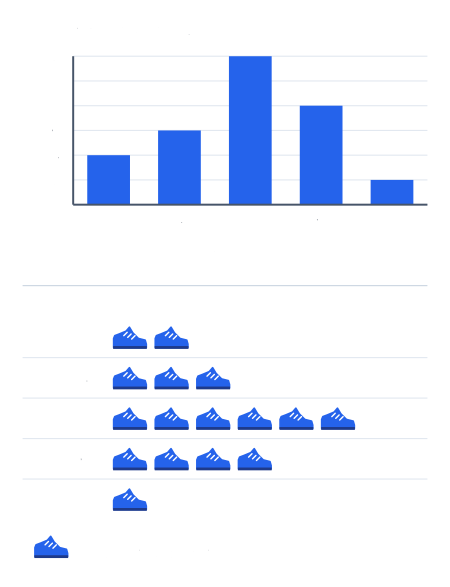
Shoe sizes in a class of 32 students. One shoe stands for 2 students.
Types of Bar Charts
1. Simple Bar Chart
Shows one variable across different categories (like the example above).
2. Compound/Multiple Bar Chart
Compares two or more variables side by side. For example, comparing male and female preferences for each sport.
3. Stacked Bar Chart
Shows parts of a whole by stacking segments on top of each other within each bar.
4. Horizontal Bar Chart
Bars run horizontally instead of vertically. Useful when category names are long.
Key Facts About Pictograms
- Purpose: Visual representation using symbols or pictures
- Key: Must include a key showing what each symbol represents
- Symbols: Use simple, clear symbols that relate to the data
- Consistency: All symbols must be the same size
- Partial symbols: Can use fractions of symbols (half, quarter, etc.)
- Alignment: Symbols should be neatly aligned
- Scale: Each symbol represents a specific number of units
Pictogram Example
Cars Sold by Dealership in January
Reading and Drawing Pictograms
Reading Pictograms
- Check the key: Find out what each symbol represents
- Count symbols: Count whole and partial symbols for each category
- Calculate: Multiply by the value from the key
Example: If Ford has 6 car symbols and the key shows 🚗 = 5 cars, then Ford sold 6 × 5 = 30 cars.
Drawing Pictograms
- Choose a suitable symbol: Related to the data (cars for car sales, books for library data)
- Decide on the scale: What will each symbol represent? Consider the range of your data
- Calculate symbols needed: Divide each value by your chosen scale
- Draw partial symbols: Use fractions for remainders (halves, quarters)
- Add key and labels: Make it clear what everything represents
💡 Exam Tips for Bar Charts & Pictograms
Bar Charts:
- Equal bar widths: All bars must be the same width
- Equal spacing: Gaps between bars should be consistent
- Start at zero: Y-axis must start at zero to avoid misleading comparisons
- Label everything: Title, axis labels, and scale markings
- Use a ruler: Draw straight, neat lines
- Check scale: Make sure your scale allows all data to fit
Pictograms:
- Choose appropriate scale: Avoid too many or too few symbols
- Partial symbols: Be precise with halves, thirds, quarters
- Alignment: Keep symbols in neat rows
- Clear key: Always state what each symbol represents
- Consistent size: All symbols must be identical in size
- Reading carefully: Pay attention to partial symbols when counting
Common Mistakes to Avoid
Bar Charts:
- ❌ Unequal bar widths: Makes comparison difficult
- ❌ Not starting at zero: Can make differences look bigger than they are
- ❌ Missing labels: Chart becomes unclear without proper labels
- ❌ Inappropriate scale: Too large or too small for the data
Pictograms:
- ❌ No key: Essential for understanding the data
- ❌ Inconsistent symbol size: Larger symbols suggest larger values incorrectly
- ❌ Poor symbol choice: Unrelated or unclear symbols
- ❌ Inaccurate partial symbols: Estimating fractions instead of calculating precisely
Compound Bar Chart Example
Make this stick
Signing in gives access to all PrepWise features.