Test yourself on Arithmetic Logic Unit (ALU) with exam style questions, marked instantly.
Flashcards that come back just before you would forget them.
A revision plan that remembers what you know and shows what to do next.
See which topics you have nailed and which need another look.
Quiz yourself on Arithmetic Logic Unit (ALU)Get your flashcardsBuild my revision planTrack my progressThe Super Calculator
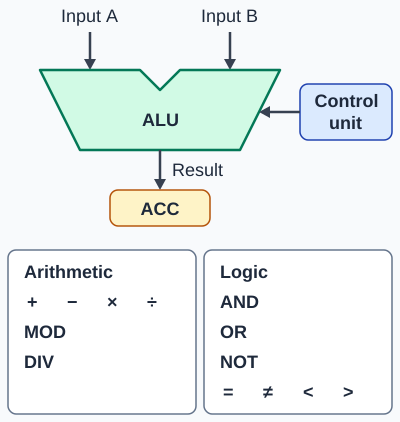
Exam board note: ACC (accumulator) is the OCR register name. AQA says knowledge of specific registers is not required.
Deep Dive: Why Logic Operations Matter
Arithmetic is only half the story. The "L" in ALU stands for Logic, and this is what makes computers smart! Logic operations allow computers to make decisions: "IF password is correct AND user has permission THEN allow access." Without logic operations, computers would just be expensive calculators!
Every IF statement, every loop condition, every comparison - all of these use the ALU's logic capabilities. When you write "if (age >= 18)", the ALU performs a comparison operation. When you write "if (isLoggedIn AND hasPermission)", the ALU performs an AND operation.
Modern ALUs are incredibly fast: They can perform billions of operations per second - adding, comparing, and making logical decisions faster than you can blink!
The Three Types of ALU Operations
1. Arithmetic Operations
Mathematical calculations that produce numerical results:
- Addition (+): 5 + 3 = 8
- Subtraction (−): 10 − 4 = 6
- Multiplication (×): 6 × 7 = 42
- Division (÷): 20 ÷ 4 = 5
- MOD (modulus): the remainder after division. 17 MOD 5 = 2
- DIV (integer division): how many whole times one number goes into another. 17 DIV 5 = 3
Real-world uses: Calculating totals in shopping carts, working out game physics, processing scientific data, rendering 3D graphics
2. Logic Operations
Boolean operations that work with True/False values:
- AND: Both inputs must be TRUE for output to be TRUE (e.g., TRUE AND TRUE = TRUE, TRUE AND FALSE = FALSE)
- OR: At least one input must be TRUE for output to be TRUE (e.g., TRUE OR FALSE = TRUE, FALSE OR FALSE = FALSE)
- NOT: Inverts the input (TRUE becomes FALSE, FALSE becomes TRUE)
- XOR (Exclusive OR): TRUE if inputs are different, FALSE if same
Real-world uses: Checking multiple conditions in IF statements, combining Boolean flags, encrypting data, validating user permissions
3. Comparison Operations
Compare two values and return True or False:
- Equal to (=): Is 5 = 5? TRUE. Is 5 = 3? FALSE
- Not equal to (≠): Is 7 ≠ 3? TRUE
- Greater than (>): Is 10 > 5? TRUE
- Less than (<): Is 3 < 8? TRUE
- Greater than or equal (≥): Is 5 ≥ 5? TRUE
- Less than or equal (≤): Is 4 ≤ 9? TRUE
Real-world uses: Age verification (age >= 18), sorting algorithms, loop conditions (while count < 10), finding minimum/maximum values
ALU Operation Examples
How the ALU Works with Other Components
- Gets data from: Accumulator (ACC) and registers/memory
- Controlled by: Control Unit (tells ALU which operation to perform)
- Stores results in: Accumulator (ACC) - results overwrite previous ACC value
- When it operates: During the EXECUTE stage of the FDE cycle
Example flow: Instruction "ADD 5" → Control Unit tells ALU "perform addition" → ALU takes current ACC value (8), adds 5 → Result (13) goes back to ACC
Exam Tips - The ALU
Always mention BOTH arithmetic AND logic:
- When asked "What does the ALU do?" → "Performs arithmetic AND logic operations"
- Don't just say "does calculations" - you'll lose marks!
- It's called Arithmetic Logic Unit - both words matter
Give specific examples:
- Arithmetic: addition, subtraction, multiplication, division
- Logic: AND, OR, NOT operations
- Comparisons: equals, greater than, less than
Remember where results go:
- ALU results are stored in the Accumulator (ACC)
- This happens during the EXECUTE stage
- The result overwrites the previous ACC value
Make this stick
Signing in gives access to all PrepWise features.