Test yourself on Trace Tables with exam style questions, marked instantly.
Flashcards that come back just before you would forget them.
A revision plan that remembers what you know and shows what to do next.
See which topics you have nailed and which need another look.
Quiz yourself on Trace TablesGet your flashcardsBuild my revision planTrack my progressVideo Lesson
Craig'n'Dave: PseudocodeCode Without a Language
Pseudocode is like writing a recipe before translating it into French, Spanish, or Chinese. It captures the logic in plain English-like statements that any programmer can understand, regardless of which language they use. There's no compiler to reject your pseudocode - it's about communicating ideas, not running on a computer. GCSE CS exams use specific pseudocode conventions you need to learn!
Trace Table Example
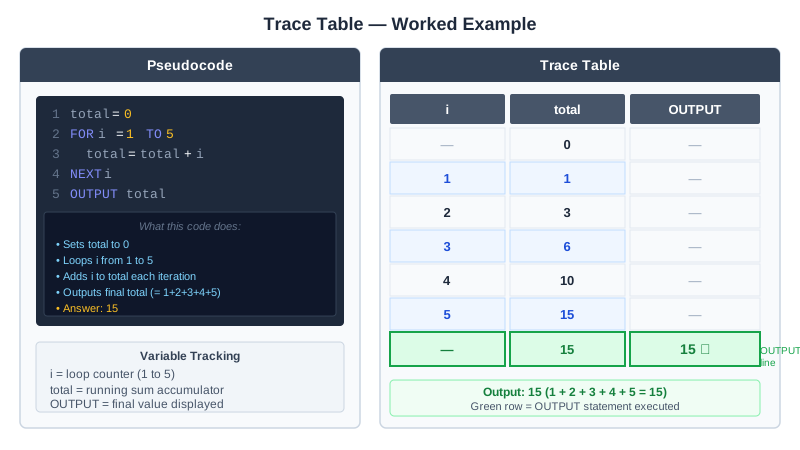
The trace table has one column for each variable (i and total) and one for OUTPUT. The row for total = 0 comes before the loop starts, and the green row is the OUTPUT line. This pseudocode ends the loop with NEXT i, which is OCR style. AQA writes ENDFOR instead. Edexcel does not set a strict pseudocode style.
GCSE Pseudocode Syntax
| Operation | Pseudocode | Example |
|---|---|---|
| Assignment | variable = value | score = 0 |
| Input | INPUT variable | INPUT name |
| Output | OUTPUT value | OUTPUT "Hello" |
| IF statement | if...then...elseif...else...endif | if age>=18 then OUTPUT "Adult" endif |
| FOR loop | for i = start to end...next i | for i = 1 to 10...next i |
| WHILE loop | while condition...endwhile | while x < 10...endwhile |
Deep Dive: GCSE Pseudocode Conventions
Comparison operators:
- == (equal to), != (not equal to)
- < (less than), > (greater than)
- <= (less than or equal), >= (greater than or equal)
Logical operators:
- AND, OR, NOT
String operations:
- string.length - length of string
- string.substring(start, length) - extract characters
- string.upper / string.lower - change case
Memory Trick
Remember structure keywords:
IF needs ENDIF
FOR needs NEXT
WHILE needs ENDWHILE
Always close what you open!
Exam Tips
- Follow GCSE pseudocode conventions: Use their exact syntax (endif, endwhile, etc.)
- Indentation: Indent code inside loops and conditions for clarity
- Common mistake: Forgetting endif/endwhile/next at the end of structures
Make this stick
Signing in gives access to all PrepWise features.