Test yourself on Input Validation with exam style questions, marked instantly.
Flashcards that come back just before you would forget them.
A revision plan that remembers what you know and shows what to do next.
See which topics you have nailed and which need another look.
Quiz yourself on Input ValidationGet your flashcardsBuild my revision planTrack my progressThe Bouncer at the Door
Validation is like a bouncer at a club - checking everyone meets the entry requirements before letting them in. You can't have negative age, a 47-character postcode, or £999,999 in a £50 limit account. Validation catches these impossible values *before* they break your program. It doesn't guarantee data is correct (someone could enter age 25 when they're 52), but it ensures data is sensible and won't crash the system.
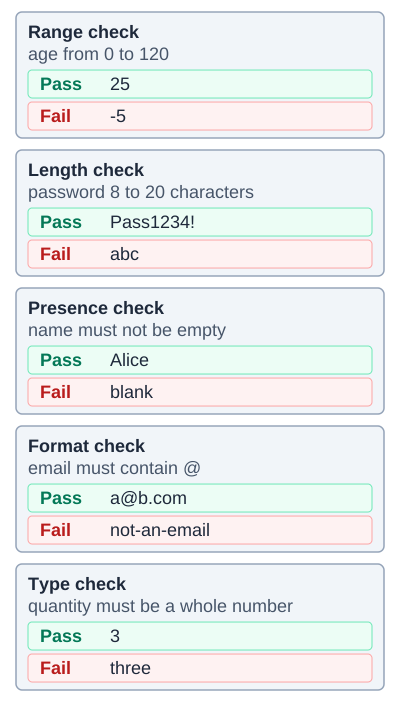
Validation is not verification. Validation checks that data is sensible, as these checks do. Verification checks that the data is what the user meant, for example by typing a password twice. A value can pass validation and still be wrong: 25 passes the range check even if the person is 52.
Types of Validation
| Type | What It Checks | Example |
|---|---|---|
| Range Check | Value within min/max limits | Age between 0 and 120 |
| Type Check | Data is correct data type | Age is an integer, not text |
| Length Check | Data has required length | Password at least 8 characters |
| Presence Check | Field isn't empty | Email address required |
| Format Check | Data matches expected pattern | Postcode: LL## #LL |
| Check Digit | Calculated digit matches | Last digit of barcode |
| Lookup Check | Value exists in a list | Country in list of countries |
Deep Dive: Validation Examples
// Range check
if age >= 0 AND age <= 120 then
    accept input
endif

// Type check
if age.isInteger() then
    accept input
endif

// Length check
if password.length >= 8 then
    accept input
endif

// Presence check
if email != "" then
    accept input
endif

// Format check (using pattern)
if postcode matches "LL## #LL" then
    accept input
endif
Memory Trick: RPTFL-C
"Repeat For Less Chaos":
- Range (min-max)
- Presence (not empty)
- Type (correct data type)
- Format (pattern match)
- Length (character count)
- Check digit (calculated)
Exam Tips
- Validation ≠ Verification: Validation checks data is sensible; verification checks it's what user intended (e.g., enter twice)
- Doesn't prove accuracy: Data can be valid but wrong (fake name passes validation)
- Combine checks: Often need multiple validation types for one field
Make this stick
Signing in gives access to all PrepWise features.