Test yourself on CPU Architecture with exam style questions, marked instantly.
Flashcards that come back just before you would forget them.
A revision plan that remembers what you know and shows what to do next.
See which topics you have nailed and which need another look.
Quiz yourself on CPU ArchitectureGet your flashcardsBuild my revision planTrack my progressThe Restaurant Kitchen
Von Neumann Architecture Diagram
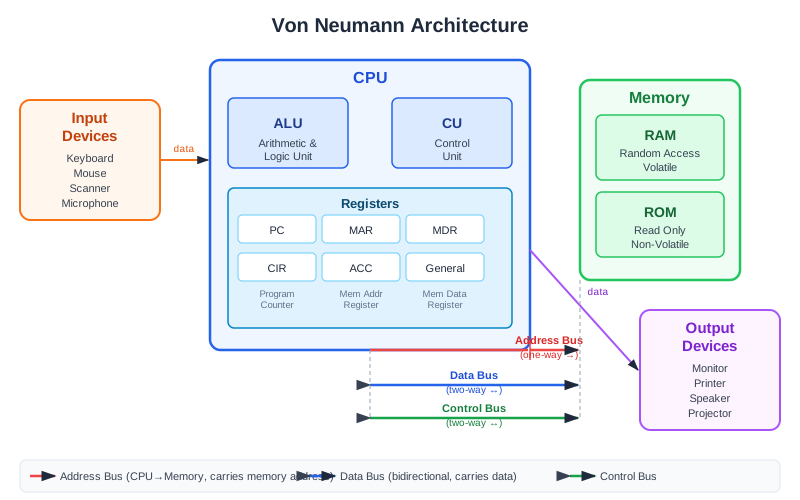
Exam board note: the register names PC, MAR, MDR and ACC are the OCR names. AQA says knowledge of specific registers is not required. Edexcel is the only board that names the address bus, data bus and control bus.
Deep Dive: Von Neumann Architecture
Modern computers follow the Von Neumann architecture, designed in the 1940s. The key idea: both the program instructions AND the data they work on are stored in the SAME memory. Think of a chef who must read the recipe from the same counter where they're preparing ingredients - they can only do ONE thing at a time.
This means the CPU and memory share one path, so the CPU can end up waiting while data travels back and forth on the buses. It's like having only one door between the kitchen and dining room - no matter how fast the chef works, orders pile up at the door!
Why this matters: Understanding Von Neumann architecture explains WHY we need cache memory (a mini-fridge next to the chef), WHY more cores help (more chefs!), and WHY some tasks can't be sped up just by making the CPU faster.
The Three Main Components of the CPU
The three main components of the CPU are: (1) the Control Unit (CU) — which fetches, decodes, and coordinates instructions; (2) the ALU (Arithmetic Logic Unit) — which performs all arithmetic, logic, and comparison operations; and (3) Registers — tiny ultra-fast storage locations inside the CPU that hold data currently being processed. These three components work together in every single CPU instruction.
1. Control Unit (CU) - The Manager
The Control Unit is the boss that coordinates everything. It:
- Fetches instructions from memory (RAM)
- Decodes instructions to understand what needs to be done
- Sends control signals to other components telling them what to do
- Manages timing using the system clock
Real-world analogy: Like an orchestra conductor - doesn't play any instrument but tells everyone else when and what to play.
2. ALU (Arithmetic Logic Unit) - The Calculator
The ALU does ALL the actual computing. It performs:
- Arithmetic operations: + - × ÷ (addition, subtraction, multiplication, division)
- Logic operations: AND, OR, NOT, XOR (Boolean operations)
- Comparison operations: = > < ≥ ≤ ≠ (is A bigger than B?)
- Bit shifting: Moving binary digits left or right
Real-world analogy: Like a super-fast calculator that can also make yes/no decisions.
3. Registers - The Sticky Notes
Registers are tiny, ultra-fast storage locations INSIDE the CPU chip itself:
- Much faster than RAM (nanoseconds vs milliseconds)
- Very small - only holds a few bytes each
- Temporary storage for data currently being processed
- Key registers (OCR names): PC, MAR, MDR, Accumulator (covered in next topics)
Real-world analogy: Like Post-it notes on a desk - quick to grab but can only hold a little information.
The Three Buses - Data Highways
Only Edexcel names the three buses.
Buses are the communication pathways connecting CPU components to memory and peripherals:
- Address Bus (one-way) - Carries the memory ADDRESS (WHERE to look). Like a postcode telling the postman which house. Goes FROM CPU TO memory only.
- Data Bus (two-way) - Carries the actual DATA (WHAT is being transferred). Like the actual letter being delivered. Goes both ways between CPU and memory.
- Control Bus (two-way) - Carries COMMAND signals (read, write, clock). Like instructions telling the postman what to do. Coordinates everything.
Address = WHERE (like an address on an envelope)
Data = WHAT (the actual content)
Control = HOW (read? write? when?)
CPU Architecture Diagram
Exam Tips - The CPU
When asked "Describe the CPU" always mention ALL THREE parts:
- Control Unit - fetches, decodes, sends control signals
- ALU - arithmetic AND logic operations
- Registers - fast temporary storage inside CPU
Common mistakes to avoid:
- Saying "ALU does calculations" - say "arithmetic AND logic operations"
- Forgetting the Control Unit sends control signals
- Confusing buses - Address is WHERE, Data is WHAT
- Saying registers store data "permanently" - they're TEMPORARY
Make this stick
Signing in gives access to all PrepWise features.