Test yourself on Linear Search with exam style questions, marked instantly.
Flashcards that come back just before you would forget them.
A revision plan that remembers what you know and shows what to do next.
See which topics you have nailed and which need another look.
Quiz yourself on Linear SearchGet your flashcardsBuild my revision planTrack my progressVideo Lesson
Craig'n'Dave: Searching AlgorithmsFinding the Needle
Looking for something in a list? You have two strategies. Linear search is like looking for a word in a dictionary by starting at page 1 and reading every word - simple but slow. Binary search is how you actually use a dictionary - open to the middle, decide if your word is before or after, then repeat. Binary is MUCH faster, but the dictionary must be alphabetical (sorted)!
Linear Search vs Binary Search Comparison
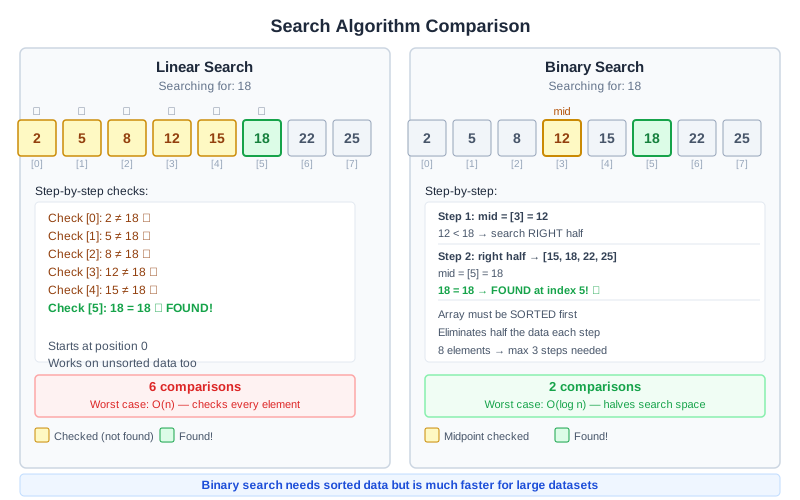
Both searches look for 18 in the same sorted list. Linear search needs 6 checks and binary search needs 2. Binary search works only because the list is sorted. The gap grows with the list: for 1,000,000 items, linear search may need up to 1,000,000 checks and binary search at most 20.
Comparison
| Aspect | Linear Search | Binary Search |
|---|---|---|
| How it works | Check each item from start to end | Divide list in half each time |
| Requires sorted data? | No | Yes |
| Best case | 1 comparison (first item) | 1 comparison (middle item) |
| Worst case (n items) | n comparisons | About one extra check each time the list doubles (1,000 items: up to 10 checks) |
| Example: 1000 items | Up to 1000 checks | Up to 10 checks |
| Speed on large lists | Slower: may check every item | Much faster: halves the list each time |
Deep Dive: Binary Search Steps
To find 23 in [3, 7, 12, 23, 34, 45, 67]:
- Find middle: 23 (index 3)
- Compare: 23 == 23 ✓
- Found! Return index 3
To find 45:
- Middle: 23. Is 45 > 23? Yes. Look right half: [34, 45, 67]
- Middle: 45. Is 45 == 45? Yes!
- Found in 2 comparisons
Remember: the list is halved every step, so binary search needs far fewer checks than linear search on a large list.
Linear Search Trace Table
To find 19 in [4, 12, 7, 3, 19, 8] (OCR Exam Reference Language style):
found = false
i = 0
while i < 6 AND found == false
    if numbers[i] == target then
        found = true
    else
        i = i + 1
    endif
endwhile
Linear search checks the items in order from index 0 until it finds the target:
| Check | i | numbers[i] | numbers[i] == 19? |
|---|---|---|---|
| 1 | 0 | 4 | No |
| 2 | 1 | 12 | No |
| 3 | 2 | 7 | No |
| 4 | 3 | 3 | No |
| 5 | 4 | 19 | Yes, found at index 4 |
The target was found after 5 comparisons, so the loop stops and index 5 is never checked. If the target is not in the list, every item is checked and found stays false.
Memory Trick
Linear = Like reading a Line from start to end
Binary = Bi means two - keep splitting in two halves
Exam Tips
- Binary requirement: ALWAYS mention data must be sorted
- Show your working: When tracing binary search, show the midpoint at each step
- Common mistake: Saying binary is "always better" - linear works on unsorted data
Make this stick
Signing in gives access to all PrepWise features.