Test yourself on SQL with exam style questions, marked instantly.
Flashcards that come back just before you would forget them.
A revision plan that remembers what you know and shows what to do next.
See which topics you have nailed and which need another look.
Quiz yourself on SQLGet your flashcardsBuild my revision planTrack my progressVideo Lesson
Craig'n'Dave: SQLTalking to Databases
SQL (Structured Query Language) is how we communicate with databases. Think of a database as a massive, organised filing cabinet. SQL is the language you use to ask questions: "Give me all customers from London" or "Show products under £50 sorted by price." SELECT retrieves data, FROM specifies the table, WHERE filters results. It's like Google for databases!
SQL Commands Reference
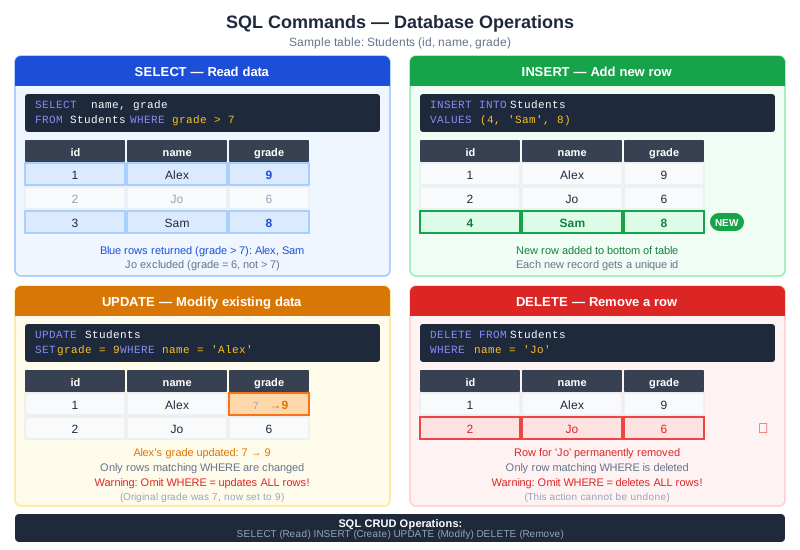
The commands run in order on one table, so each table is the result of the command above it. SELECT, FROM and WHERE are on AQA and OCR. INSERT, UPDATE and DELETE are on AQA only. Edexcel has no SQL.
Warning: if you leave out WHERE, the command changes every row. UPDATE Students SET grade = 9 sets every grade to 9, and DELETE FROM Students removes every row. The WHERE line picks out only the rows you mean.
SQL Commands
| Command | Purpose | Example |
|---|---|---|
| SELECT | Choose columns to display | SELECT name, age |
| FROM | Specify the table | FROM Students |
| WHERE | Filter rows by condition | WHERE age > 16 |
| ORDER BY | Sort results | ORDER BY name ASC |
| AND / OR | Multiple conditions | WHERE age > 16 AND city = "London" |
| * (wildcard) | Select all columns | SELECT * |
| INSERT INTO (AQA only) | Add a new row | INSERT INTO Students VALUES (3, 'Sam', 8) |
| UPDATE ... SET (AQA only) | Change values in the rows that match WHERE | UPDATE Students SET grade = 9 WHERE name = 'Alex' |
| DELETE FROM (AQA only) | Remove the rows that match WHERE | DELETE FROM Students WHERE name = 'Jo' |
Deep Dive: Complete SQL Examples
Get all students:
SELECT * FROM Students
Get names of students over 16:
SELECT name FROM Students WHERE age > 16
Get products under £50, sorted by price:
SELECT name, price FROM Products
WHERE price < 50
ORDER BY price ASC
Practical SQL Query Examples
Given this Students table:
| StudentID | Name | Age | City | Score |
|---|---|---|---|---|
| 1 | Alice | 15 | London | 85 |
| 2 | Bob | 17 | Manchester | 72 |
| 3 | Charlie | 16 | London | 91 |
| 4 | Diana | 17 | Leeds | 68 |
| 5 | Eve | 15 | London | 95 |
Query 1: All London students
SELECT Name, Age FROM Students WHERE City = "London"
-- Returns: Alice (15), Charlie (16), Eve (15)
Query 2: Students aged 16+ sorted by score (highest first)
SELECT Name, Score FROM Students
WHERE Age >= 16
ORDER BY Score DESC
-- Returns: Charlie (91), Bob (72), Diana (68)
Query 3: London students with score over 90
SELECT * FROM Students
WHERE City = "London" AND Score > 90
-- Returns: Charlie (91), Eve (95)
Query 4: Students from London OR Manchester
SELECT Name, City FROM Students
WHERE City = "London" OR City = "Manchester"
-- Returns: Alice, Bob, Charlie, Eve
Memory Trick
S-F-W-O = The order of SQL:
SELECT (what columns)
FROM (which table)
WHERE (filter rows)
ORDER BY (sort results)
Exam Tips
- Syntax order: SELECT...FROM...WHERE...ORDER BY
- Strings in quotes: WHERE name = "Alice"
- Common mistake: Forgetting FROM clause
Make this stick
Signing in gives access to all PrepWise features.