Test yourself on String Handling with exam style questions, marked instantly.
Flashcards that come back just before you would forget them.
A revision plan that remembers what you know and shows what to do next.
See which topics you have nailed and which need another look.
Quiz yourself on String HandlingGet your flashcardsBuild my revision planTrack my progressVideo Lesson
Craig'n'Dave: String HandlingWorking with Text
Strings are everywhere - names, addresses, passwords, messages. String handling is the art of manipulating text. Need to extract the first 3 characters? Check if an email contains "@"? Convert to UPPERCASE? Concatenate first name and surname? These operations are essential for any program that deals with text!
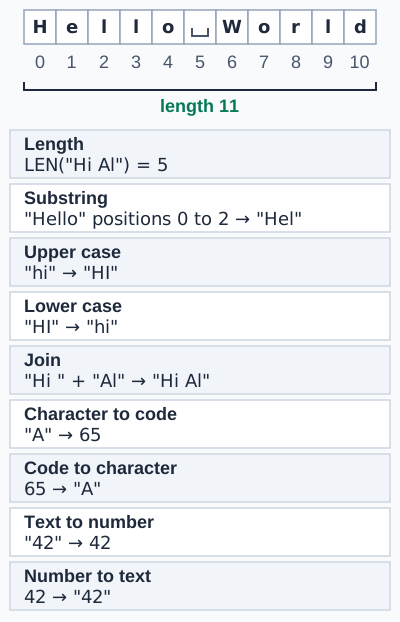
The open box symbol marks a space, and a space counts as a character, so "Hello World" has length 11. The figure counts substring positions 0 to 2, which gives "Hel". In OCR style that is "Hello".substring(0, 3), because OCR takes a start position and a number of characters. The figure writes length as a plain label; OCR writes .length. Upper and lower case conversion is on OCR and Edexcel. Character to code and code to character are on AQA and OCR (OCR writes ASC and CHR). Text to number and number to text are on AQA and OCR.
GCSE String Operations
| Operation | Pseudocode | Example | Result |
|---|---|---|---|
| Length | string.length | "Hello".length | 5 |
| Substring | string.substring(start, length) | "Hello".substring(0, 2) | "He" |
| Uppercase | string.upper | "Hello".upper | "HELLO" |
| Lowercase | string.lower | "Hello".lower | "hello" |
| Concatenation | string1 + string2 | "Hi" + " " + "there" | "Hi there" |
| ASCII conversion | ASC(char), CHR(code) | ASC("A"), CHR(65) | 65, "A" |
| Text to number, number to text | int(string), str(number) | int("42"), str(42) | 42, "42" |
Deep Dive: String Indexing
Strings are 0-indexed (first character is position 0):
text = "HELLO"
// Index: 0 1 2 3 4
// Char:  H E L L O

text.substring(0, 1) = "H"
text.substring(1, 3) = "ELL"
text[2] = "L"
Memory Trick
ASC = ASCII code (letter → number)
CHR = CHaRacter (number → letter)
Substring(start, length) = START where, take LENGTH chars
Exam Tips
- 0-indexed: First character is at position 0
- Substring: substring(start, length) not substring(start, end)
- Common mistake: Forgetting strings are immutable - operations return new strings
Make this stick
Signing in gives access to all PrepWise features.