Test yourself on Operating Systems with exam style questions, marked instantly.
Flashcards that come back just before you would forget them.
A revision plan that remembers what you know and shows what to do next.
See which topics you have nailed and which need another look.
Quiz yourself on Operating SystemsGet your flashcardsBuild my revision planTrack my progressThe Computer Manager
Operating System Functions Overview
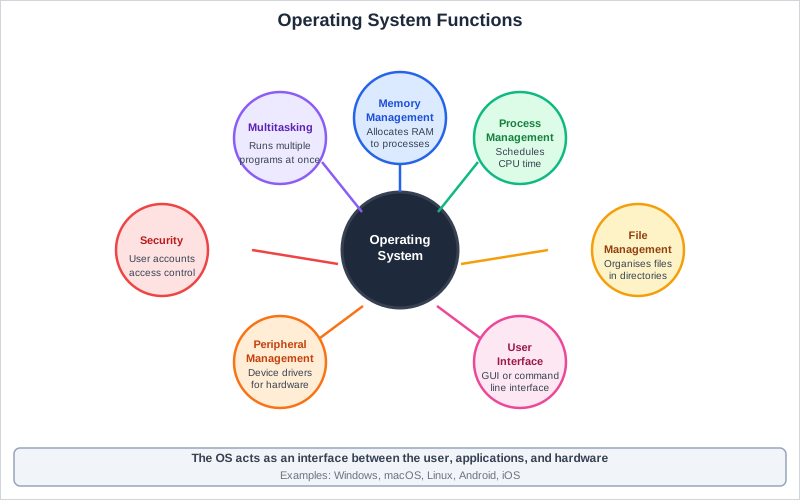
Exam board note: user management is in the OCR and Edexcel specifications. Memory management is named by OCR only. Multitasking and the user interface are named by OCR only. Edexcel calls the processor side of the job process management.
Functions of an Operating System
| Function | Description | Example |
|---|---|---|
| Memory Management | Allocates RAM to programs; manages virtual memory (OCR only) | Swapping inactive apps to disk when RAM is full |
| Multitasking | Schedules CPU time between processes (multitasking) | Switching between Chrome, Word, Spotify quickly |
| File Management | Organises files in folders; controls read/write access | File Explorer, permissions, file extensions |
| Peripheral Management | Communicates with hardware peripherals via device drivers | Installing printer driver to print documents |
| User Interface | Provides way to interact (GUI, CLI) | Windows desktop, terminal/command prompt |
| User Management | User accounts, passwords, access rights, security | Login screens, admin permissions |
Deep Dive: User Interfaces
GUI (Graphical User Interface):
- Windows, icons, menus, pointers (WIMP)
- Easy to use, intuitive, visual
- Uses more system resources
- Example: Windows desktop, macOS
CLI (Command Line Interface):
- Text-based commands typed by user
- Faster for experts, powerful scripting
- Steeper learning curve
- Example: Command Prompt, Terminal, PowerShell
Deep Dive: Multitasking
Modern computers run multiple programs simultaneously through time-slicing:
- CPU rapidly switches between tasks (milliseconds)
- Each process gets a time slice
- Appears simultaneous to users
- OS scheduler decides priority and order
Multi-core processors can run tasks in true parallel - each core handles different processes!
Operating System Functions
Memory Trick
Memory management
User interface
File management
Peripheral management
Security (user management)
+ Multitasking (the sixth function)
Exam Tips - Operating Systems
- Know all six functions: Memory management, multitasking, file management, peripheral management, user interface, user management
- GUI vs CLI: Know advantages and disadvantages of each
- Common mistake: Saying OS "runs programs" - be specific about HOW (scheduling, memory allocation)
Make this stick
Signing in gives access to all PrepWise features.