Test yourself on Program Counter & Accumulator with exam style questions, marked instantly.
Flashcards that come back just before you would forget them.
A revision plan that remembers what you know and shows what to do next.
See which topics you have nailed and which need another look.
Quiz yourself on Program Counter & AccumulatorGet your flashcardsBuild my revision planTrack my progressThe Bookmark and the Whiteboard
Exam board note: program counter and accumulator are the OCR register names. AQA says knowledge of specific registers is not required. OCR says you do not need to know how data passes between registers in each stage.
Deep Dive: Why These Registers Are Critical
Without the Program Counter, the CPU would have no idea what to do next. Every program is a sequence of instructions stored in memory. The PC ensures the CPU knows exactly which instruction to fetch next - it's the backbone of sequential execution. During normal operation, the PC increments by 1 each cycle, moving through instructions in order.
However, not all programs are sequential! When you encounter a loop (like "FOR i = 1 TO 10") or an IF statement that branches to different code, the PC gets updated with a new address (a JUMP or BRANCH instruction). This is how programs can repeat sections or make decisions - by manipulating the PC.
The Accumulator's role: The ALU can perform billions of calculations per second, but where do the results go? The ACC acts as a temporary holding area. For example, calculating (5 + 3) × 2 requires two operations: first 5+3=8 goes to ACC, then 8×2=16 replaces it in ACC. Without the ACC, you'd need to write every intermediate result to slower main memory!
Program Counter (PC) - The Instruction Tracker
What It Is:
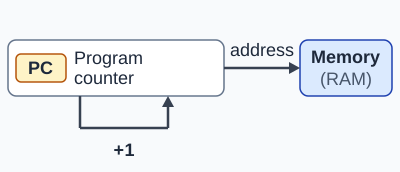
The Program Counter is a special register that holds the memory address of the NEXT instruction to be fetched and executed. It's like a bookmark keeping your place in a book.
How It Works:
- During FETCH: The address in PC is copied to the MAR
- After FETCH: The PC automatically increments (adds 1) to point to the next sequential instruction
- During branches: JUMP, BRANCH, or CALL instructions can change the PC to a different address (for loops, IF statements, functions)
- On program start: PC is set to the address of the first instruction
Key Characteristics:
- Holds an address (not data or instructions)
- Increments during the FETCH stage of the FDE cycle
- Size depends on the address bus width (e.g., 32-bit PC can address 2³² locations)
- Essential for sequential execution and program flow control
Real-world analogy: Like line numbers in a script. An actor (CPU) reads line 5, performs the action, then automatically looks at line 6 next. Unless the script says "GOTO line 20" (a branch instruction), the actor continues sequentially.
Accumulator (ACC) - The Result Holder
What It Is:
The Accumulator is a register that stores the results of calculations performed by the ALU. It's a temporary workspace for arithmetic and logic operations.
How It Works:
- Before calculation: ACC may hold one of the values to be used (e.g., in "ADD 5", ACC holds the current value, 5 is added to it)
- During EXECUTE: The ALU performs the operation
- After calculation: The result is stored in the ACC, overwriting the previous value
- Can be used again: The ACC value can be used in the next operation or stored to memory with a STORE instruction
Key Characteristics:
- Holds data values (not addresses or instructions)
- Updated during the EXECUTE stage of the FDE cycle
- Is often one of the values the ALU works on, so it does not need to be named in every instruction
- Faster than storing results to main memory (RAM)
Real-world analogy: Like a calculator's display screen. When you calculate 5 + 3, the screen shows 8. When you then multiply by 2, the screen updates to 16. The ACC works the same way - showing the current result.
PC and ACC in the FDE Cycle
Comparison: PC vs ACC
| Aspect | Program Counter (PC) | Accumulator (ACC) |
|---|---|---|
| What it holds | Memory address (of next instruction) | Data value (result of calculation) |
| When it changes | During FETCH stage (increments) | During EXECUTE stage (result stored) |
| Change type | Usually +1 (sequential) or jump to new address | Overwritten with new result |
| Purpose | Track program flow / which instruction is next | Store intermediate calculation results |
| Controlled by | Control Unit (increments) or branch instructions | ALU (writes results) |
Exam Tips - PC and Accumulator
Common exam questions and how to answer them:
- "When does the PC change?" → During the FETCH stage, it increments by 1
- "When does the ACC change?" → During the EXECUTE stage, when ALU stores a result
- "What does the PC hold?" → The address (not the instruction itself!) of the NEXT instruction
- "What does the ACC hold?" → The result of the most recent ALU operation
Common mistakes to avoid:
- Saying PC holds "the current instruction" - it holds the ADDRESS of the NEXT instruction
- Saying PC increments during EXECUTE - it increments during FETCH
- Confusing ACC with other registers (MAR/MDR) - ACC is specifically for ALU results
- Forgetting that branch/jump instructions change the PC to non-sequential addresses
Make this stick
Signing in gives access to all PrepWise features.