Test yourself on Binary Search with exam style questions, marked instantly.
Flashcards that come back just before you would forget them.
A revision plan that remembers what you know and shows what to do next.
See which topics you have nailed and which need another look.
Quiz yourself on Binary SearchGet your flashcardsBuild my revision planTrack my progressFinding Something Fast
Binary search is like guessing a number between 1 and 100 when the friend only says "higher" or "lower". You do not start at 1. You guess 50, and every answer lets you throw away half of the numbers. Binary search does the same on a sorted list: check the middle item, decide which half the target must be in, discard the other half, and repeat.
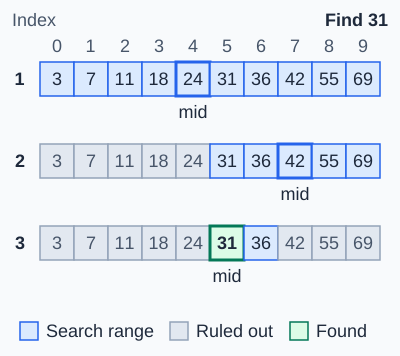
Binary search needs a sorted list. Each check looks at the middle of the search range, then rules out the half that cannot hold the target. Here 31 is found in 3 checks. The most checks grow very slowly: 10 items need at most 4 checks, and 1,000,000 items need at most 20.
Binary Search or Linear Search?
| Feature | Binary Search | Linear Search |
|---|---|---|
| Method | Check the middle item, discard half, repeat | Check each item one by one from the start |
| List must be sorted? | Yes | No |
| Speed on a large list | Much faster, because half the items go each step | Slower, because it may check every item |
| Best used when | The list is large, sorted and searched often | The list is short or unsorted |
Deep Dive: The Steps of Binary Search
- Make sure the list is sorted.
- Set the low pointer to the first position and the high pointer to the last position.
- Find the midpoint: (low + high) DIV 2. DIV means divide and drop any remainder.
- Compare the middle item with the target.
- Equal: the target is found. Stop.
- Target is larger: it must be in the right half, so set low to mid + 1.
- Target is smaller: it must be in the left half, so set high to mid - 1.
- Repeat from step 3. If low becomes greater than high, the target is not in the list.
Deep Dive: Worked Example
Find 23 in [2, 5, 8, 12, 16, 23, 38] (positions 0 to 6):
| Step | Low | High | Midpoint | Middle item | Decision |
|---|---|---|---|---|---|
| 1 | 0 | 6 | 3 | 12 | 23 is bigger, keep the right half |
| 2 | 4 | 6 | 5 | 23 | Equal: found at position 5 |
Only two items were checked. A linear search would have checked six.
Searching for 10 in the same list: low 0, high 6, mid 3 (12) so high becomes 2. Mid 1 (5) so low becomes 2. Mid 2 (8) so low becomes 3. Now low (3) is greater than high (2), so 10 is not found.
Deep Dive: Pseudocode
found = False
low = 0
high = numbers.length - 1
while low <= high AND found == False
    mid = (low + high) DIV 2
    if numbers[mid] == target then
        found = True
    elseif numbers[mid] < target then
        low = mid + 1
    else
        high = mid - 1
    endif
endwhile
This follows OCR reference language. AQA and Edexcel questions use a similar structure with their own pseudocode style.
Memory Trick
Sorted first, then halve. Think of looking up a name in a printed phone book: you open it near the middle, see whether your name comes before or after, and ignore the other half.
Low and High mark the edges of what is still being searched. When Low passes High, nothing is left.
Exam Tips
- Always say the list must be sorted. This is the most common mark point for binary search.
- Show each step: write down low, high, the midpoint and the middle item every time.
- Compare with linear search: binary search is faster on large sorted lists, but linear search works on unsorted lists and needs no sorting first.
- Common mistake: searching the wrong half. If the target is larger than the middle item, keep the right half.
Make this stick
Signing in gives access to all PrepWise features.