Test yourself on Protocols with exam style questions, marked instantly.
Flashcards that come back just before you would forget them.
A revision plan that remembers what you know and shows what to do next.
See which topics you have nailed and which need another look.
Quiz yourself on ProtocolsGet your flashcardsBuild my revision planTrack my progressThe Language of Networks
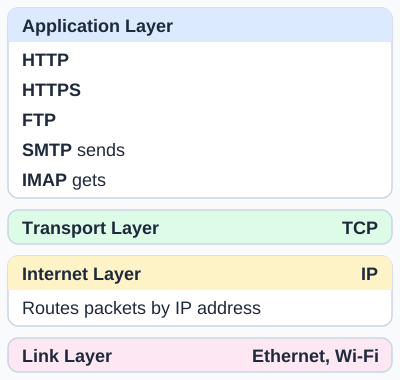
What each protocol is for. HTTP loads web pages. HTTPS is the encrypted version of HTTP. FTP transfers files. SMTP sends email. IMAP gets email from a mail server. TCP makes sure data arrives complete and in order. IP addresses and routes packets between networks. Ethernet (wired) and Wi-Fi (wireless) carry data over the local link.
Deep Dive: Why Protocols Matter
Protocols are essential because they define HOW data is transmitted:
- Format: How should data be structured? (headers, body, encoding)
- Timing: When should devices transmit? How long to wait for response?
- Error handling: What happens if data is corrupted or lost?
- Authentication: How do we verify identity and ensure security?
The key principle: Different protocols for different purposes. HTTP for web browsing, SMTP for email, FTP for file transfers. Each optimized for its specific task!
HTTP - HyperText Transfer Protocol
What is HTTP?
The protocol used for transmitting web pages across the Internet. When you type a URL in your browser, HTTP defines how your browser requests the page and how the web server responds.
How HTTP Works:
- Request-Response model: Client (browser) sends request, server sends response
- HTTP Request: the browser asks the server for a specific page
- HTTP Response: Server sends HTML, CSS, JavaScript, images
HTTP Example Flow:
1. You type www.bbc.co.uk in browser
2. Browser sends a request for the page
3. Server responds that the request is OK
4. Server sends HTML page
5. Browser displays webpage
HTTP Limitations:
- NOT secure: Data transmitted in plain text
- Can be intercepted: Anyone on network can read HTTP traffic
- No encryption: Passwords, credit cards sent openly
HTTPS - HyperText Transfer Protocol Secure
What is HTTPS?
HTTP with encryption. The "S" stands for Secure. HTTPS encrypts all data transmitted between browser and server, protecting it from interception.
How HTTPS Works:
- Encryption: HTTPS encrypts the HTTP traffic
- Padlock icon: Browser shows padlock in address bar for HTTPS sites
- Certificate: Server has digital certificate verifying its identity
- Encrypted data: Even if intercepted, data is unreadable without decryption key
HTTPS Advantages:
- Secure: Data encrypted - cannot be read if intercepted
- Privacy: Protects passwords, credit cards, personal information
- Authentication: Certificate verifies you're connecting to real website (not fake)
- Integrity: Detects if data is tampered with during transmission
- Trust: Users trust sites with padlock icon
When HTTPS is Essential:
- Banking: Protect financial transactions and account details
- Shopping: Secure credit card information
- Email: Protect login credentials and message content
- Social media: Secure passwords and private messages
- Any login: Prevent password interception
HTTP vs HTTPS:
| Aspect | HTTP | HTTPS |
|---|---|---|
| Security | NOT secure (plain text) | Secure (encrypted) |
| Padlock Icon | No | Yes |
| Certificate | Not required | Required |
| Use Case | Public information only | Logins, payments, sensitive data |
FTP - File Transfer Protocol
What is FTP? (OCR and Edexcel)
Protocol for transferring files between computers over a network. Used for uploading website files to web servers, downloading large files, and sharing files between systems.
How FTP Works:
- Client-Server model: FTP client connects to FTP server
- Authentication: Requires username and password (or anonymous access)
- Upload/Download: Files can be uploaded to the server or downloaded from it
- Directory navigation: Browse folders on remote server like local filesystem
FTP Uses:
- Website management: Upload HTML, CSS, JavaScript to web server
- File sharing: Share large files between organizations
- Backups: Transfer backup files to remote storage
- Software distribution: Download software from FTP servers
FTP Limitations:
- NOT secure: Passwords and data sent in plain text
- Vulnerable: Credentials can be intercepted
SMTP - Simple Mail Transfer Protocol
What is SMTP?
Protocol for sending email from client to server, or between email servers. When you click "Send" in your email app, SMTP delivers your message.
How SMTP Works:
- Sending only: SMTP is for SENDING emails, not receiving
- Server-to-server: Your mail server forwards message to recipient's mail server
- Store-and-forward: If recipient server is unavailable, SMTP retries later
Email Sending Process:
1. You write email and click Send
2. Your email client uses SMTP to send to your mail server
3. Your mail server uses SMTP to forward to recipient's mail server
4. Recipient's mail server stores the email
5. Recipient uses POP3/IMAP to download email
Receiving Email (POP3/IMAP):
- POP3 (Post Office Protocol; Edexcel names POP3, OCR names POP): Downloads emails from server to device, then deletes from server
- IMAP (Internet Message Access Protocol): Keeps emails on server, syncs across multiple devices
- SMTP vs POP3/IMAP: SMTP = sending, POP3/IMAP = receiving
Protocol Comparison Table
| Protocol | Full Name | Purpose | Security |
|---|---|---|---|
| HTTP | HyperText Transfer Protocol | Load web pages | NOT secure (plain text) |
| HTTPS | HTTP Secure | Load web pages securely | Secure (encrypted) |
| FTP | File Transfer Protocol (OCR and Edexcel) | Transfer files | NOT secure (plain text) |
| SMTP | Simple Mail Transfer Protocol | Send emails | Can be encrypted |
| POP3 | Post Office Protocol v3 (Edexcel; OCR names POP) | Download emails (delete from server) | Can be encrypted |
| IMAP | Internet Message Access Protocol | Access emails (keep on server) | Can be encrypted |
Real-World Scenario: A Day in the Life of Protocols
Imagine your typical morning online - every action uses a specific protocol:
8:00 AM - Check Email:
- Your email client uses IMAP to sync messages from server
- You see new emails without downloading them (they stay on server)
8:15 AM - Reply to Email:
- You click Send - email client uses SMTP to send your reply
- Your mail server forwards via SMTP to recipient's server
- Recipient will use IMAP/POP3 to retrieve it
9:00 AM - Browse News:
- You visit www.bbc.co.uk - browser uses HTTPS
- Padlock icon shows connection is encrypted
- All data transmitted securely (articles, images, videos)
10:00 AM - Online Shopping:
- You buy something on Amazon - HTTPS protects credit card
- Without HTTPS, your card number would be sent in plain text!
- Certificate confirms you're on real Amazon, not fake site
11:00 AM - Upload Website Files (Web Developer):
- Use FTP to upload HTML/CSS files to web server
- FTP sends the password in plain text, so only use it on a trusted network
Key Insight:
Every online action uses a specific protocol. HTTP/HTTPS for web. SMTP sends email and IMAP retrieves it. FTP for files. Each protocol optimized for its purpose!
Exam Tips - Network Protocols
Questions that come up:
- "What is HTTP?" → Protocol for transferring web pages over the Internet
- "Difference HTTP vs HTTPS?" → HTTPS is encrypted/secure. HTTP is plain text/insecure.
- "Why use HTTPS for banking?" → Encrypts data (credit cards, passwords) so can't be read if intercepted
- "What is FTP?" → Protocol for transferring files between computers
- "What is SMTP?" → Protocol for SENDING emails (not receiving)
- "SMTP vs POP3/IMAP?" → SMTP sends emails. POP3/IMAP receive emails.
Key facts to memorize:
| Protocol | Purpose | Secure? |
|---|---|---|
| HTTP | Web pages | NO |
| HTTPS | Web pages (encrypted) | YES (encrypted) |
| FTP | File transfers | NO |
| SMTP | Send emails | Can encrypt |
Common mistakes to avoid:
- Confusing SMTP (sending) with POP3/IMAP (receiving) - they're different!
- Saying "HTTP is for websites, HTTPS is for emails" - NO! Both are for web, HTTPS just adds encryption
- Forgetting WHY HTTPS is important (encryption prevents interception)
- Saying FTP is secure - it sends passwords and data in plain text
Perfect exam answer structure:
"Explain why HTTPS should be used for online banking" (3 marks):
HTTPS encrypts data transmitted between browser and server (1 mark).
Protects sensitive information like credit card numbers and passwords (1 mark).
Even if intercepted, data cannot be read without decryption key (1 mark).
Quick Reference - Protocols Summary
HTTP (HyperText Transfer Protocol):
- Purpose: Transfer web pages
- Security: NOT secure (plain text)
- Use: Public information only (being replaced by HTTPS)
HTTPS (HTTP Secure):
- Purpose: Transfer web pages securely
- Security: Encrypted
- Use: Banking, shopping, logins, any sensitive data
FTP (File Transfer Protocol; OCR and Edexcel):
- Purpose: Transfer files between computers
- Security: NOT secure (plain text)
- Use: Upload website files, file sharing
SMTP (Simple Mail Transfer Protocol):
- Purpose: SEND emails (not receive)
- Security: Can be encrypted
- Receiving: Use POP3 (download; Edexcel, OCR names POP) or IMAP (sync)
The Golden Rule:
Different protocols for different purposes! HTTP/HTTPS for web, SMTP for sending email, FTP for files. ALWAYS use HTTPS when handling sensitive data!
Make this stick
Signing in gives access to all PrepWise features.