Test yourself on Testing with exam style questions, marked instantly.
Flashcards that come back just before you would forget them.
A revision plan that remembers what you know and shows what to do next.
See which topics you have nailed and which need another look.
Quiz yourself on TestingGet your flashcardsBuild my revision planTrack my progressFinding Bugs Before Users Do
Testing is trying to break your own program before releasing it. Like a car manufacturer crash-testing vehicles - better to find problems in the factory than on the road! You need to test with normal data (should work), extreme/boundary data (edge cases), and erroneous data (data the program should reject). If you only test with data you expect, you'll miss bugs users will find immediately.
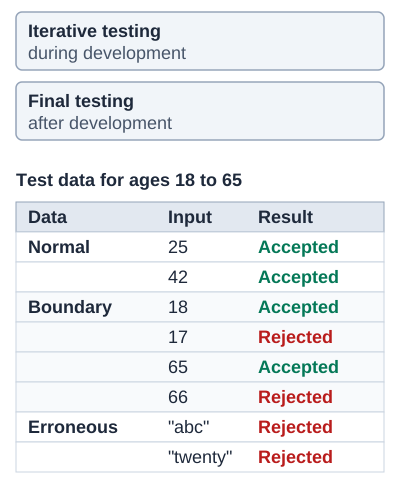
Exam boards: iterative and final testing are named by OCR. AQA names normal, boundary and erroneous data, and erroneous data is any data the program should reject. OCR splits it in two: erroneous data is data of the wrong data type (such as "abc"), and invalid data is data of the right type that should be rejected (such as 200). Edexcel names test data without the three types.
Types of Test Data
| Type | Description | Example (Age 18-65) |
|---|---|---|
| Normal | Typical expected data | 25, 40, 50 |
| Boundary | Values at the edges of the valid range. AQA: either side of each limit. OCR: the correct-type value on the very edge of being valid | AQA: 17, 18, 65, 66. OCR: 18, 65 |
| Erroneous | AQA: any data the program should reject. OCR: data of the wrong data type, which should be rejected | "abc", "twenty" (AQA also: -5, 200) |
| Invalid (OCR) | OCR: data of the right type but outside the range, which should be rejected | -5, 200 |
Deep Dive: Testing Methods
| Method | Description | When Used |
|---|---|---|
| Iterative Testing | Test each module as it's developed | During development |
| Final/Terminal Testing | Test complete program end-to-end | When development finished |
Deep Dive: Test Plan Example
| Test | Test Data | Type | Expected Result |
|---|---|---|---|
| 1 | 30 | Normal | Accepted |
| 2 | 18 | Boundary | Accepted (lower limit) |
| 3 | 17 | Boundary (AQA) or invalid (OCR) | Rejected (below limit) |
| 4 | 65 | Boundary | Accepted (upper limit) |
| 5 | 66 | Boundary (AQA) or invalid (OCR) | Rejected (above limit) |
| 6 | "twenty" | Erroneous | Rejected (wrong type) |
| 7 | -5 | Invalid (OCR) or erroneous (AQA) | Rejected (negative) |
Memory Trick: NBE
"Nothing Breaks Easily" (but we test anyway!):
- Normal - everyday data
- Boundary - edge values
- Erroneous - data the program should reject
Exam Tips
- Boundary = both sides (AQA): Test value just inside AND just outside the limit. OCR boundary data is the valid edge value itself
- State expected outcome: Always say what SHOULD happen for each test
- Iterative catches early: Finding bugs early is cheaper and easier to fix
Make this stick
Signing in gives access to all PrepWise features.