Test yourself on File Handling with exam style questions, marked instantly.
Flashcards that come back just before you would forget them.
A revision plan that remembers what you know and shows what to do next.
See which topics you have nailed and which need another look.
Quiz yourself on File HandlingGet your flashcardsBuild my revision planTrack my progressVideo Lesson
Craig'n'Dave: File HandlingPermanent Storage
Variables are temporary - turn off the computer and they're gone! Files provide permanent storage. Think of files like notebooks - you can write in them, read from them, and they're still there tomorrow. Games save your progress to files. Apps store your settings. Databases are just organised files. Without file handling, every program would start fresh every time!
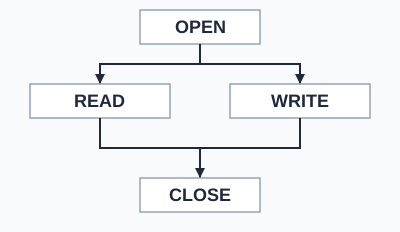
Every use of a file starts with OPEN and ends with CLOSE. In between, the program reads or writes. File handling is named by OCR and Edexcel. AQA names none. Here is the OCR style:
myFile = open("data.txt")
line = myFile.readLine()
myFile.writeLine("New line")
myFile.close()
Edexcel asks you to read from and write to comma separated value text files, and does not set a strict pseudocode style.
File Operations
| Operation | GCSE Pseudocode | Purpose |
|---|---|---|
| Open | myFile = open("file.txt") | Open the file, stored in a variable, ready to read or write |
| Create a new file | newFile("file.txt") | Make an empty text file, then open it with open() |
| Read line | line = myFile.readLine() | Read next line from file |
| Write line | myFile.writeLine("text") | Write a line to the end of the file |
| Close file | myFile.close() | Close file when done |
| End of file | myFile.endOfFile() | Check if at end of file |
Deep Dive: Reading All Lines
// Read all lines from a file
myFile = open("data.txt")
while NOT myFile.endOfFile()
    line = myFile.readLine()
    OUTPUT line
endwhile
myFile.close()
Always close files! Leaving files open can cause data loss or corruption.
Memory Trick
ORC - the three steps:
Open the file
Read or Write
Close the file
Exam Tips
- Always close: Files must be closed after use
- EOF check: Use endOfFile() to avoid reading past end
- Common mistake: Forgetting to close files
Make this stick
Signing in gives access to all PrepWise features.