Test yourself on Defensive Design with exam style questions, marked instantly.
Flashcards that come back just before you would forget them.
A revision plan that remembers what you know and shows what to do next.
See which topics you have nailed and which need another look.
Quiz yourself on Defensive DesignGet your flashcardsBuild my revision planTrack my progressBuilding Software Armour
Defensive design is programming like a pessimist - assuming everything that can go wrong, will go wrong. It's like building a castle with thick walls, a moat, and guards. You don't wait for attackers - you prepare for them. This means checking inputs, handling errors gracefully, and writing code others can understand. A good programmer doesn't trust users to enter sensible data or other programmers to use functions correctly!
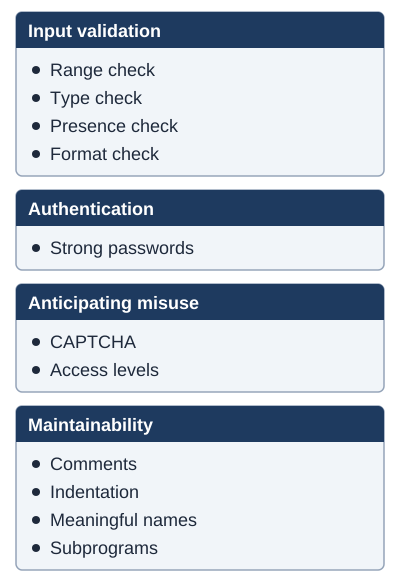
Exam boards: the four headings (input validation, authentication, anticipating misuse and maintainability) are named by OCR. CAPTCHA is named by AQA.
Defensive Design Principles
| Principle | Description | Example |
|---|---|---|
| Input Validation | Check data before processing | Age must be 0-120 |
| Input Sanitisation | Clean/remove dangerous characters | Remove < > from text |
| Anticipating Misuse | Plan for incorrect/malicious use | Limit login attempts |
| Authentication | Verify user identity | Username + password |
| Maintainability | Code that's easy to update | Comments, naming, indentation |
Deep Dive: Maintainable Code
| Technique | Purpose | Example |
|---|---|---|
| Comments | Explain complex logic | // Calculate discount for members |
| Indentation | Show code structure | 4 spaces inside IF blocks |
| Naming Conventions | Clear variable/function names | customerAge not x |
| Subprograms | Break code into reusable parts | function calculateTax() |
| Constants | Named values that don't change | const VAT_RATE = 0.20 |
Memory Trick: VSCAM
Defensive design:
- Validate input
- Sanitise data
- Comments for clarity
- Anticipate misuse
- Maintainable code
Exam Tips
- Validation vs Sanitisation: Validation checks data is acceptable; sanitisation cleans/removes dangerous content
- Why maintain? Other programmers may need to update your code
- Link to security: Input sanitisation prevents SQL injection and XSS attacks
Make this stick
Signing in gives access to all PrepWise features.