Test yourself on Selection (IF Statements) with exam style questions, marked instantly.
Flashcards that come back just before you would forget them.
A revision plan that remembers what you know and shows what to do next.
See which topics you have nailed and which need another look.
Quiz yourself on Selection (IF Statements)Get your flashcardsBuild my revision planTrack my progressVideo Lesson
Craig'n'Dave: SelectionMaking Decisions
Life is full of decisions: "IF it's raining, take an umbrella, ELSE wear sunglasses." Programs work the same way. Selection lets programs choose different paths based on conditions. IF the user enters the correct password, let them in. ELSE, show an error. Multiple choices? Use ELSEIF or SWITCH/CASE. Every game, every app makes thousands of decisions every second!
Selection and Iteration Flowcharts
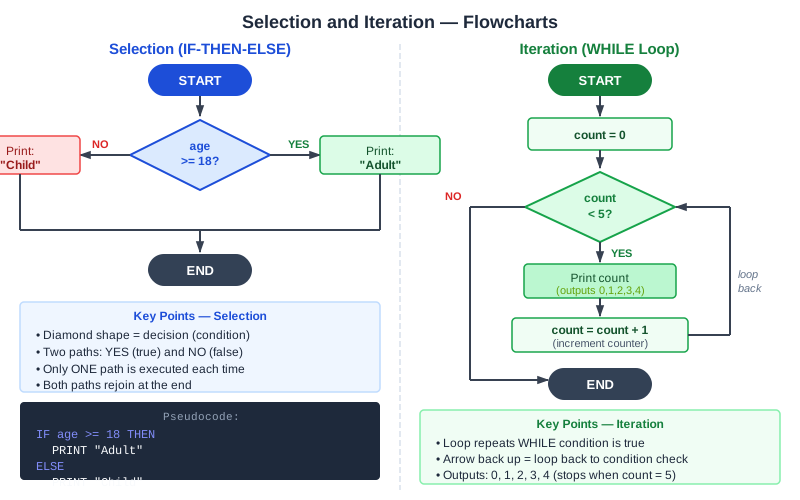
The top flowchart is selection: the program takes one path or the other, then both paths join. The bottom flowchart is iteration: the YES path goes round again until the test fails. Here is the same pair of programs in OCR style.
if age >= 18 then
    print("Adult")
else
    print("Child")
endif

count = 0
while count < 5
    print(count)
    count = count + 1
endwhile
AQA writes the keywords in capitals and ends with ENDIF and ENDWHILE, for example IF ... THEN ... ELSE ... ENDIF and WHILE ... ENDWHILE, and uses ← for assignment. Edexcel does not set a strict pseudocode style.
Selection Structures
| Structure | Use When | GCSE Pseudocode |
|---|---|---|
| IF | Single condition | if condition then...endif |
| IF-ELSE | Two alternatives | if...then...else...endif |
| IF-ELSEIF-ELSE | Multiple conditions | if...then...elseif...else...endif |
| SWITCH/CASE | Many specific values | switch...case...default...endswitch |
Deep Dive: Nested IF Statements
if age >= 18 then
    if hasLicense == true then
        OUTPUT "Can drive"
    else
        OUTPUT "Need license"
    endif
else
    OUTPUT "Too young"
endif
IF statements can be placed inside other IF statements - this is nesting. Be careful with indentation!
Deep Dive: Switch/Case
switch day:
    case "Monday":
        OUTPUT "Start of week"
    case "Friday":
        OUTPUT "Nearly weekend!"
    default:
        OUTPUT "Regular day"
endswitch
Use switch when comparing one variable against many specific values.
Practical Examples (GCSE Pseudocode & Python)
Example 1: Grade Calculator
GCSE Pseudocode:
INPUT score
if score >= 70 then
    grade = "A"
elseif score >= 60 then
    grade = "B"
elseif score >= 50 then
    grade = "C"
elseif score >= 40 then
    grade = "D"
else
    grade = "U"
endif
OUTPUT "Grade: " + grade
Python Equivalent:
score = int(input("Enter score: "))
if score >= 70:
    grade = "A"
elif score >= 60:
    grade = "B"
elif score >= 50:
    grade = "C"
elif score >= 40:
    grade = "D"
else:
    grade = "U"
print("Grade:", grade)
Example 2: Login Validation
INPUT username
INPUT password
if username == "admin" AND password == "secret123" then
    OUTPUT "Access granted"
    loggedIn = true
else
    OUTPUT "Access denied"
    loggedIn = false
endif
Memory Trick
IF = Is it true? Follow this path
ELSE = Everything else goes here
ELSEIF = Extra conditions to check
Exam Tips
- Always close: Every IF needs an ENDIF
- Indent properly: Shows structure clearly
- Common mistake: Using = instead of == in conditions
Make this stick
Signing in gives access to all PrepWise features.