Test yourself on Virtual Memory with exam style questions, marked instantly.
Flashcards that come back just before you would forget them.
A revision plan that remembers what you know and shows what to do next.
See which topics you have nailed and which need another look.
Quiz yourself on Virtual MemoryGet your flashcardsBuild my revision planTrack my progressThe Desk with a Filing Cabinet
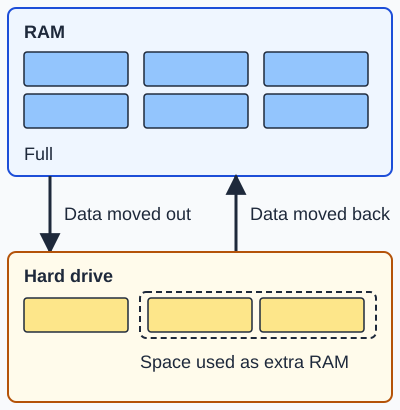
This is virtual memory. When RAM is full, the operating system moves data that is not in use out to the hard drive, and moves it back when it is needed. Virtual memory is named by OCR only.
Deep Dive: What is Virtual Memory?
Virtual memory is a memory management technique that creates the illusion that a computer has more RAM than it physically does. It does this by temporarily transferring data from RAM to disk storage (hard drive or SSD), freeing up RAM for active processes.
When your computer runs out of physical RAM, the operating system automatically moves less-used data from RAM to a special area on the hard drive called the page file (Windows) or swap space (Linux/macOS). This process is called swapping.
Extra: OCR only. Virtual memory is named in the OCR specification. AQA and Edexcel do not name it.
How Virtual Memory Works
The Process:
- Memory fills up: You open too many programs - Chrome with 20 tabs, Word, Excel, Spotify, Photoshop. Physical RAM (8GB) is now full.
- OS intervenes: Operating system identifies less-used data in RAM (e.g., a background program you haven't touched in 10 minutes).
- Swapping out: OS copies this data from RAM to the page file on the hard drive, freeing up RAM space.
- New program loads: The freed RAM is now available for the new program you want to run.
- Swapping in: When you switch back to that background program, OS swaps it back from hard drive to RAM and may swap out something else.
Key Terms:
- Page file / Swap space: Reserved area on hard drive used as virtual memory extension
- Swapping: The process of moving data between RAM and hard drive
- Severe slowdown: If the system spends more time swapping than running programs, it becomes very slow
Benefits vs. Drawbacks of Virtual Memory
| Benefits (Why Use It?) | Drawbacks (Problems) |
|---|---|
| Run more programs: Enables running more programs than physical RAM allows | Much slower: Disk storage is thousands of times slower than RAM (an SSD about 1,000 times, a hard disk about 100,000 times) - noticeable lag when swapping |
| Prevents crashes: System won't crash when RAM fills up - uses disk instead | Severe slowdown: Excessive swapping causes system to become almost unusable |
| Larger programs possible: Can run programs larger than available RAM | Wear on SSD: Constant writing to SSD reduces lifespan (especially concern for older SSDs) |
| Better multitasking: More programs can stay "open" simultaneously | Not true RAM: Can't replace physical RAM - always slower alternative |
| Transparent to user: Operating system handles automatically | Hard to diagnose: Users may not realize lack of RAM is causing slowdown |
| Keeps the computer running: Avoids out-of-memory crashes when RAM is full | Takes disk space: Page file can be several GB, reducing available storage |
When Virtual Memory Gets Used
Common Scenarios:
- Too many browser tabs: Chrome with 50 tabs can use 8GB+ RAM - older tabs get swapped out
- Large applications: Video editing (Premiere Pro), 3D rendering (Blender), gaming with mods
- Background programs: Antivirus, updaters, system services accumulate memory usage
- Memory leaks: Buggy programs that don't release memory properly force more swapping
- Insufficient RAM: Running modern OS (Windows 11, macOS) on only 4GB RAM
Signs You're Using Virtual Memory Heavily:
- Hard drive light constantly flashing (mechanical HDD)
- Programs take 5-10 seconds to respond when switching between them
- Clicking a minimized window shows delay before it appears
- Windows Task Manager shows "Memory: 98% (7.8/8GB)" - almost full
- Hearing HDD grinding noise when opening programs (constant swapping)
Real-World Example: Gaming Scenario
Scenario: You have 8GB RAM and want to play a modern game that recommends 12GB.
What happens:
- Step 1: Windows 11 takes 3GB RAM for OS
- Step 2: Game loads and needs 10GB RAM, but only 5GB available
- Step 3: OS swaps some Windows system services out to hard drive (creates 4GB free)
- Step 4: Game loads into 9GB RAM + 1GB virtual memory (runs, but stutters)
- Step 5: When game needs that swapped-out data, OS swaps it back (causes frame drops)
- Result: Game runs but with lag spikes every few seconds - playable but frustrating
Solution: Upgrade to 16GB RAM. Virtual memory is a backup, not a replacement!
Virtual Memory: SSD vs HDD
| Aspect | Virtual Memory on SSD | Virtual Memory on HDD |
|---|---|---|
| Speed Impact | Noticeable slowdown but tolerable (10-50ms delay) | Severe slowdown (100-500ms+ delay) |
| User Experience | Programs stutter briefly when swapping | Programs freeze for several seconds |
| Heavy use | Can handle moderate swapping before slowing a lot | Slows a lot quickly with heavy swapping |
| Wear Concern | Older SSDs have limited write cycles (modern SSDs handle it fine) | HDDs can handle unlimited writes |
| Best Use | Emergency backup when RAM temporarily full | Only for basic tasks (web browsing, documents) |
Exam Tips - Virtual Memory
Most common exam questions:
- "What is virtual memory?" → Uses hard drive/SSD space as extension of RAM when RAM is full
- "Why use virtual memory?" → Allows more programs to run than physical RAM permits / prevents crashes
- "Drawback of virtual memory?" → Much slower than RAM because hard drive access is slow / can make the whole system very slow
- "What is swapping?" → Moving data between RAM and hard drive to free up RAM space
Key phrases to use:
- Definition: "Uses hard drive space as extension of RAM" or "temporary storage on disk when RAM full"
- Benefit: "Allows more programs to run simultaneously" + "prevents out-of-memory crashes"
- Drawback: "Much slower than physical RAM" + "disk storage is far slower than RAM" +"causes performance degradation"
- Process: "Data swapped between RAM and hard drive" or "moving data in and out of RAM"
Common mistakes to avoid:
- Saying virtual memory is faster than RAM - NO! It's always slower (hard drive < RAM)
- Confusing virtual memory with RAM - virtual memory is on the HARD DRIVE
- Forgetting to mention the speed drawback - always say "slower than RAM"
- Not explaining WHY it's needed - link to "running out of physical RAM"
Extended answer structure (4+ marks):
- Definition: Virtual memory uses hard drive space as extension of RAM
- When used: When physical RAM is full and more memory needed
- Process: OS moves less-used data from RAM to page file on hard drive (swapping)
- Benefit: Allows running more programs than physical RAM permits / prevents crashes
- Drawback: Much slower than RAM because hard drive access is slow / can cause severe performance degradation
- Conclusion: Virtual memory is essential safety feature but not a replacement for physical RAM
Quick Reference - Virtual Memory
Core Concept:
- Virtual memory = using hard drive as RAM extension
- Activated when physical RAM is full
- Data swapped between RAM ↔ hard drive (swapping)
- Transparent to user (OS handles automatically)
Three Main Benefits:
- Run more programs than physical RAM allows
- Prevents out-of-memory crashes
- Enables larger programs to run
Three Main Drawbacks:
- Much slower than physical RAM (thousands of times slower)
- System becomes very slow when overused (too much swapping)
- Increased wear on SSDs from constant writing
Speed Comparison:
- RAM access: 10-100 nanoseconds (0.00001 ms)
- SSD access: 0.1 milliseconds (about 1,000 times slower than RAM)
- HDD access: 10+ milliseconds (about 100,000 times slower than RAM)
The Golden Rule:
Virtual memory is a BACKUP, not a replacement for physical RAM. If you're constantly using virtual memory, you need more RAM!
Make this stick
Signing in gives access to all PrepWise features.