Test yourself on Types of Malware with exam style questions, marked instantly.
Flashcards that come back just before you would forget them.
A revision plan that remembers what you know and shows what to do next.
See which topics you have nailed and which need another look.
Quiz yourself on Types of MalwareGet your flashcardsBuild my revision planTrack my progressThe Digital Diseases
Malware Taxonomy
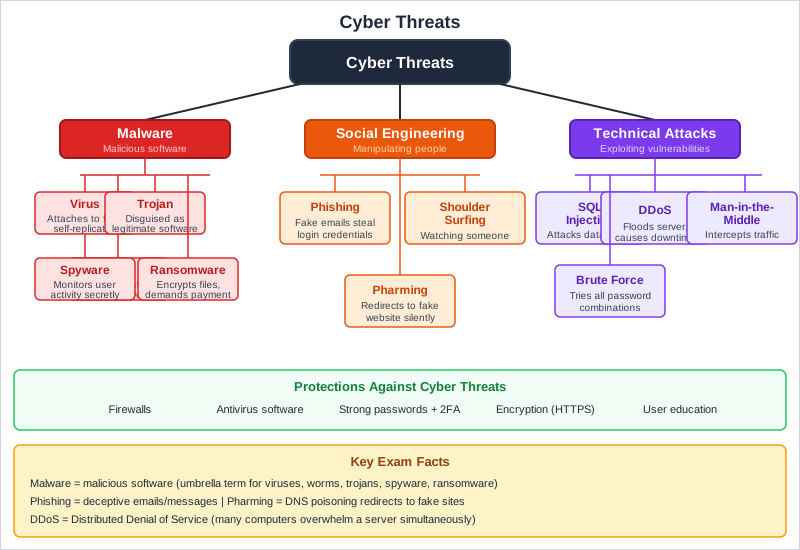
Exam boards: virus and Trojan are named by AQA and Edexcel. Worm and ransomware are named by Edexcel. Spyware is named by AQA. Adware is not in the figure, but the table below covers it.
What is Malware?
Malware (malicious software) is any software intentionally designed to cause damage to a computer, server, network, or to steal data. There are many different types, each with different methods of spreading and causing harm.
Types of Malware
| Type | How it Works | How it Spreads |
|---|---|---|
| Virus | Attaches to legitimate files; activates when file runs | Email attachments, downloads, USB drives |
| Worm | Self-replicates; doesn't need host file | Networks, exploits vulnerabilities automatically |
| Trojan | Disguised as legitimate software; creates backdoor | Fake downloads, phishing emails |
| Ransomware | Encrypts files; demands payment for decryption key | Phishing emails, malicious websites |
| Spyware | Monitors activity; steals personal data | Bundled with free software, drive-by downloads |
| Adware | Displays unwanted advertisements | Bundled with free software |
Deep Dive: Virus vs Worm - The Critical Difference
Understanding the difference between viruses and worms is crucial for GCSE exams:
VIRUS:
- Host dependency: MUST attach to a legitimate file or program
- User action required: Only spreads when user runs/opens the infected file
- Spread mechanism: User shares infected files via email, USB, downloads
- Analogy: Like biological viruses - need a host cell to survive and replicate
WORM:
- Standalone: Independent program - doesn't need a host file
- Self-replicating: Spreads automatically without user intervention
- Spread mechanism: Exploits network vulnerabilities to copy itself to other systems
- Analogy: Like an organism that crawls/wriggles between systems independently
Deep Dive: How to Protect Against Malware
- Anti-malware software - Scans for and removes malicious programs; keep updated with latest virus definitions
- Keep software updated - Security patches fix vulnerabilities that malware exploits
- Don't click suspicious links - Verify sender before opening email attachments
- Download from trusted sources - Official app stores, verified websites only
- Regular backups - Ransomware can't hold you hostage if you have recent backups
- Use a firewall - Blocks unauthorised network connections and worm propagation
- User education - Train users to recognize threats and practice safe computing habits
Exam Tips
- Key difference: Virus needs host file + user action; Worm is standalone + self-replicates automatically
- Don't confuse: Trojan doesn't replicate - it tricks users into installing it
- Common question: "How can users protect against malware?" - give SPECIFIC methods (not just "be careful")
- Ransomware danger: Always mention that data may be permanently lost even if ransom is paid
- Comparison questions: If asked to compare types, make clear distinctions for BOTH types
Memory Tricks
- Virus = Needs a host (like biological viruses need host cells)
- Worm = Wriggles through networks on its own
- Trojan = Trojan Horse - gift hiding soldiers inside
- Ransomware = Holds files for ransom
- Spyware = Spies on you
- Adware = Annoying ads
Make this stick
Signing in gives access to all PrepWise features.