Test yourself on Translators with exam style questions, marked instantly.
Flashcards that come back just before you would forget them.
A revision plan that remembers what you know and shows what to do next.
See which topics you have nailed and which need another look.
Quiz yourself on TranslatorsGet your flashcardsBuild my revision planTrack my progressVideo Lesson
Craig'n'Dave: Compilers and InterpretersThe Language Translators
Imagine you have a Spanish book and need to read it in English. An interpreter is like someone reading it aloud, translating each sentence as they go - slower but you hear it immediately. A compiler is like someone translating the whole book first, then giving you the English version - takes time upfront but then you can read it as fast as you like! An assembler is simpler - converting Assembly mnemonics to machine code, almost word-for-word.
Compiler, Interpreter and Assembler Comparison
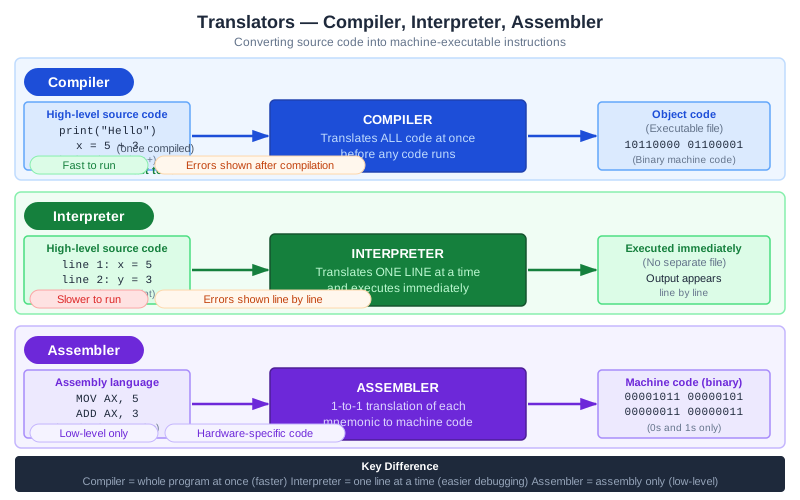
The compiler gives machine code (a standalone executable file). The interpreter runs the code as it translates it and gives output. The assembler is covered in the table below and is not drawn here. Exam board note: OCR says understanding of assemblers is not required.
Types of Translators
| Translator | Input | Output | Process |
|---|---|---|---|
| Compiler | High-level source code | Standalone executable | Translates all at once |
| Interpreter | High-level source code | Executes directly (no file) | Translates line by line |
| Assembler | Assembly language | Machine code | 1-to-1 translation |
Deep Dive: Compiler vs Interpreter
| Aspect | Compiler | Interpreter |
|---|---|---|
| Translation | Whole program at once | Line by line as it runs |
| Output | Creates executable file | No file created |
| Errors | Reports all errors after compilation | Stops at first error found |
| Execution speed | Fast (already translated) | Slower (translates each time) |
| Distribution | Can share without source code | Must share source code |
| Development | Slower (recompile after changes) | Faster (run immediately) |
Memory Trick
COMpiler = COMplete (translates all)
INTerpreter = INTermittent (line by line)
ASSembler = ASSembly only (1-to-1)
Exam Tips
- Both needed: Compiled programs are faster to run; interpreted is faster to develop/test
- Source code: Interpreter needs source every time; compiler creates standalone .exe
- Error finding: Interpreter finds errors as it runs; compiler finds all before running
Make this stick
Signing in gives access to all PrepWise features.