Test yourself on Fetch-Decode-Execute Cycle with exam style questions, marked instantly.
Flashcards that come back just before you would forget them.
A revision plan that remembers what you know and shows what to do next.
See which topics you have nailed and which need another look.
Quiz yourself on Fetch-Decode-Execute CycleGet your flashcardsBuild my revision planTrack my progressThe Restaurant Order System
Fetch-Decode-Execute Cycle
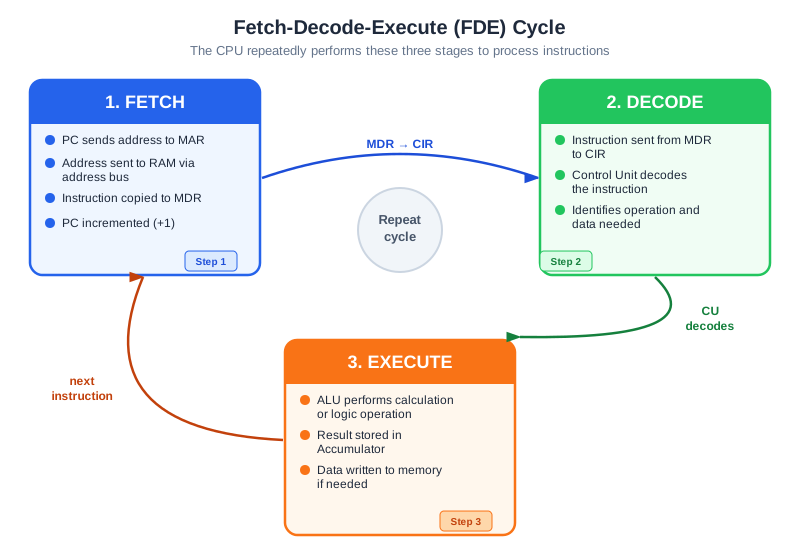
Exam board note: every board teaches the three stages. The register steps below use the OCR register names (PC, MAR, MDR, ACC), but OCR says you do not need to know how data passes between registers in each stage. AQA says knowledge of specific registers is not required. Edexcel is the only board that names the address bus, data bus and control bus in the cycle.
Deep Dive: The Heartbeat of Computing
Every single thing your computer does goes through this cycle. Clicking a mouse? FDE cycle. Typing a letter? FDE cycle. Rendering a game frame? Millions of FDE cycles per second. This three-stage pattern is the fundamental rhythm of all modern computers.
The cycle never stops while the computer is on. Even when you're not actively using your computer, the CPU is running FDE cycles - managing background processes, checking for input, updating the clock. A 3 GHz processor has 3 billion clock cycles every second. One instruction can need one or more clock cycles, so it does not always run 3 billion instructions a second.
Why three stages and not one? Separation of concerns! FETCH gets data from slow memory (can be optimized with cache), DECODE figures out what to do (Control Unit's job), EXECUTE does the actual work (ALU's job). This division allows each part of the CPU to specialize and work efficiently.
Stage 1: FETCH - "Get the Instruction"
The Fetch-Decode-Execute (FDE) cycle is the three-stage sequence every CPU uses to process instructions. Fetch: the PC holds the address of the next instruction → copied to MAR → instruction retrieved from RAM into MDR → PC increments. Decode: the Control Unit works out what the fetched instruction means. Execute: the ALU carries out the operation and stores the result in the Accumulator. This cycle repeats continuously — every program instruction goes through exactly these three stages, billions of times per second.
Purpose: Retrieve the next instruction from main memory (RAM)
Detailed Step-by-Step Process:
- Step 1: The address currently in the PC (Program Counter) is copied to the MAR (Memory Address Register)
- Step 2: The address in MAR is sent along the Address Bus to main memory
- Step 3: Memory locates the instruction at that address
- Step 4: The instruction is sent back via the Data Bus to the MDR (Memory Data Register)
- Step 5: The PC is incremented (+1) to point to the address of the next instruction
Key Registers Involved (OCR names):
- PC: Holds address of next instruction, then increments
- MAR: Receives the address from PC, sends it to memory
- MDR: Receives the instruction from memory
Memory trick: "Please Make Mum Dinner" = PC → MAR → Memory → (back to) MDR, then the PC adds 1 to itself (PC+1)
Stage 2: DECODE - "Understand the Instruction"
Purpose: Work out what the instruction means and what needs to be done
What Happens:
- The Control Unit examines the instruction that was just fetched
- Extra for every board (not named in any specification): an instruction can be thought of as two parts, what to do (the operation) and what data to use
- The CU works out what operation needs to be performed (e.g., ADD, LOAD, STORE, JUMP)
- The CU identifies what data or memory addresses are involved
- The CU prepares control signals to coordinate the necessary components
Example Instruction Breakdown:
- Instruction: "ADD 5" stored as binary
- Operation: "ADD" - tells the CU this is an addition operation
- Data: "5" - tells the CU to add the number 5
- CU Decision: "Prepare ALU for addition, get current ACC value, add 5 to it"
No data changes during DECODE: This stage is purely about understanding and preparing - no actual calculations happen yet, and registers like PC and ACC don't change.
Stage 3: EXECUTE - "Do the Instruction"
Purpose: Carry out the actual operation specified by the instruction
What Happens Depends on Instruction Type:
Arithmetic/Logic Operation (e.g., ADD, SUBTRACT, AND):
- The ALU performs the calculation or logic operation
- The result is stored in the Accumulator (ACC)
- Example: ADD 5 → ALU adds 5 to current ACC value → new total goes to ACC
Data Transfer (e.g., LOAD, STORE):
- LOAD: Data is copied from memory to a register (usually ACC)
- STORE: Data is copied from a register to memory
- Example: LOAD 200 → fetch data from memory address 200 → copy to ACC
Control Flow (e.g., JUMP, BRANCH, CALL):
- The PC is changed to a different address (not just +1)
- This allows loops, IF statements, and function calls
- Example: JUMP 100 → PC is set to 100 → next FETCH will get instruction from address 100
Different instructions take different amounts of time: A simple ADD might take 1 clock cycle, but a MULTIPLY might take several cycles.
The Complete FDE Cycle
FDE Stage Comparison
| Stage | What Happens | Registers Changed | Component |
|---|---|---|---|
| FETCH | Get instruction from memory | PC (increments), MAR, MDR | Control Unit + Memory |
| DECODE | Interpret instruction meaning | None | Control Unit |
| EXECUTE | Perform the operation | ACC (if calculation), PC (if branch) | ALU or CU |
Exam Tips - FDE Cycle
Describing the FETCH sequence is a common exam question. Learn it step by step (OCR register names; AQA and Edexcel do not require them):
- Line 1: "PC is copied to MAR" (1 mark)
- Line 2: "Address sent via Address Bus to memory" (1 mark)
- Line 3: "Instruction sent via Data Bus to MDR" (1 mark)
- Line 4: "PC is incremented to point to next instruction" (1 mark)
Common exam questions:
- "Describe the FETCH stage" → Use the 4 steps above, one per line
- "What happens in DECODE?" → Control Unit examines the fetched instruction, works out what operation to perform
- "When does PC increment?" → During FETCH (NOT execute!)
- "When does ACC change?" → During EXECUTE (when ALU completes calculation) (OCR register names; AQA and Edexcel do not require them)
Common mistakes to avoid:
- Saying PC increments during EXECUTE - it's during FETCH!
- Missing the MAR and MDR registers in the FETCH sequence
- Saying data changes during DECODE - nothing changes in DECODE!
Make this stick
Signing in gives access to all PrepWise features.