Test yourself on Operators with exam style questions, marked instantly.
Flashcards that come back just before you would forget them.
A revision plan that remembers what you know and shows what to do next.
See which topics you have nailed and which need another look.
Quiz yourself on OperatorsGet your flashcardsBuild my revision planTrack my progressVideo Lesson
Craig'n'Dave: OperatorsThe Tools of Calculation
Operators are the verbs of programming - they DO things to data. Arithmetic operators do maths (+, -, *, /). Comparison operators ask questions (==, !=, <, >). Logical operators combine conditions (AND, OR, NOT). Master these and you can make computers calculate anything!
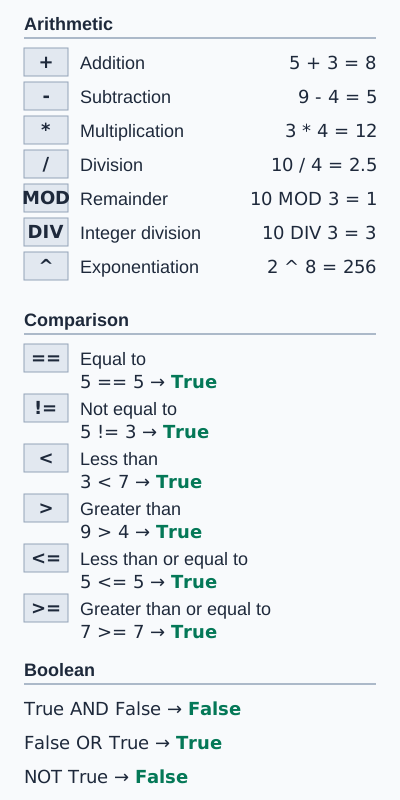
The figure uses OCR style for comparisons: == for equal to and != for not equal to. AQA writes = for equal to and ≠ for not equal to. The exponent ^ is on OCR and Edexcel only. DIV and MOD are on all three boards.
Operator Types
| Type | Operator | Meaning | Example |
|---|---|---|---|
| Arithmetic | + | Addition | 5 + 3 = 8 |
| - | Subtraction | 5 - 3 = 2 | |
| * | Multiplication | 5 * 3 = 15 | |
| / | Division | 5 / 2 = 2.5 | |
| DIV (//) | Integer division | 5 DIV 2 = 2 | |
| MOD (%) | Modulus (remainder) | 5 MOD 2 = 1 | |
| ^ (OCR and Edexcel only) | Exponent (to the power of) | 2 ^ 8 = 256 | |
| Comparison | == (OCR style; AQA writes =) | Equal to | 5 == 5 → true |
| != (OCR style; AQA writes ≠) | Not equal to | 5 != 3 → true | |
| <, >, <=, >= | Less/greater than | 5 > 3 → true | |
| Logical | AND | Both must be true | true AND false → false |
| OR | At least one true | true OR false → true | |
| NOT | Inverts value | NOT true → false |
AND, OR and NOT: Truth Table
| A | B | A AND B | A OR B | NOT A |
|---|---|---|---|---|
| true | true | true | true | false |
| true | false | false | true | false |
| false | true | false | true | true |
| false | false | false | false | true |
Deep Dive: DIV and MOD
DIV (integer division) - divides and throws away the remainder:
- 17 DIV 5 = 3 (17 ÷ 5 = 3 remainder 2)
- 10 DIV 3 = 3
MOD (modulus) - gives only the remainder:
- 17 MOD 5 = 2
- 10 MOD 3 = 1
Common uses:
- Check if even:
number MOD 2 == 0 - Get last digit:
number MOD 10 - Cycle through 0-9:
counter MOD 10
Memory Trick
DIV = Division without remainder (Integer result)
MOD = M for "Modulus" = M for "Made it into the remainder"
Exam Tips
- DIV vs /: DIV gives integer, / gives real
- MOD uses: Know how to check odd/even, extract digits
- Common mistake: On OCR and in Python, using = instead of == for comparison. AQA pseudocode writes = for equal to, so follow the style the paper uses.
Make this stick
Signing in gives access to all PrepWise features.