Test yourself on Pseudocode & Flowcharts with exam style questions, marked instantly.
Flashcards that come back just before you would forget them.
A revision plan that remembers what you know and shows what to do next.
See which topics you have nailed and which need another look.
Quiz yourself on Pseudocode & FlowchartsGet your flashcardsBuild my revision planTrack my progressVideo Lesson
Craig'n'Dave: FlowchartsDrawing Your Algorithm
Before writing code, programmers often draw their solution. A flowchart is like a map for your algorithm - showing the journey from start to finish. Different shapes mean different things: ovals for start/end (like motorway junctions), parallelograms for input/output (like toll booths), rectangles for processes (like roadworks), and diamonds for decisions (like roundabouts where you choose direction). Follow the arrows!
Flowchart Symbols Reference
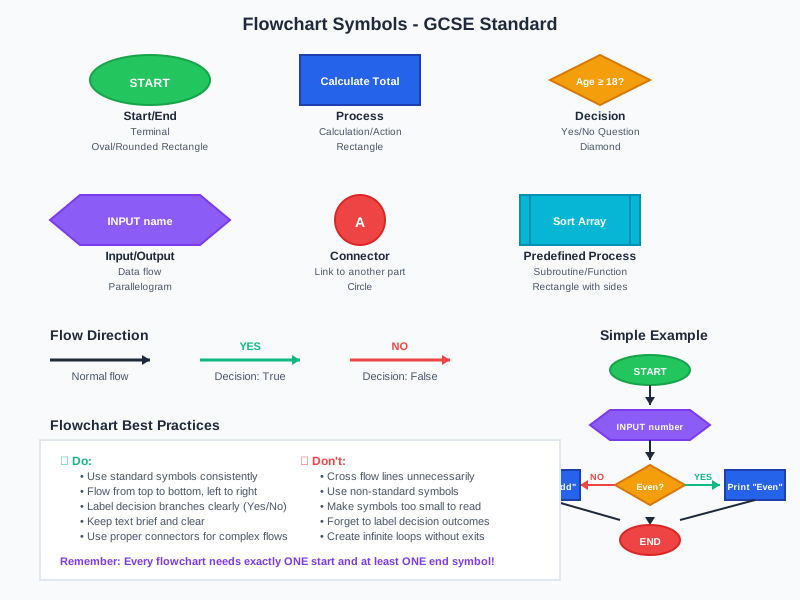
The top half names each symbol. The bottom half uses them in a short flowchart that prints Even or Odd. The decision diamond has two labelled exits, YES and NO. OCR and Edexcel list these flowchart symbols in their specifications, including the subroutine symbol. AQA examines flowcharts but does not list the symbols.
Flowchart Symbols
| Symbol | Name | Purpose | Example |
|---|---|---|---|
| ⬭ | Oval/Terminator | Start or End | START, END, STOP |
| ▱ | Parallelogram | Input or Output | INPUT name, OUTPUT total |
| ▭ | Rectangle | Process/Calculation | total = price * quantity |
| ◇ | Diamond | Decision (Yes/No) | Is age >= 18? |
| → | Arrow | Flow direction | Shows order of execution |
Flowchart Symbol Reference & Example
Deep Dive: Reading Flowcharts
Tips for following flowcharts:
- Always start at the START oval
- Follow arrows in their direction
- At diamonds, evaluate the condition and follow Yes or No
- Loops return back to earlier parts (arrows pointing upward/backward)
- End when you reach the STOP/END oval
Trace tables help track variable values as you trace through a flowchart - essential for exam questions!
Memory Trick
OPRD - Flowchart shapes:
Oval = Start/End (O for Origin)
Parallelogram = I/O (P for Put in/out)
Rectangle = Process (R for Run calculation)
Diamond = Decision (D for Decide)
Exam Tips
- Use correct symbols: Marks are lost for using wrong shapes
- Label arrows: Decision diamonds need Yes/No labels on arrows
- Trace tables: Practice tracing through flowcharts with different inputs
Make this stick
Signing in gives access to all PrepWise features.