Test yourself on IDE Features with exam style questions, marked instantly.
Flashcards that come back just before you would forget them.
A revision plan that remembers what you know and shows what to do next.
See which topics you have nailed and which need another look.
Quiz yourself on IDE FeaturesGet your flashcardsBuild my revision planTrack my progressVideo Lesson
Craig'n'Dave: IDEsThe Programmer's Workshop
An IDE (Integrated Development Environment) is like a workshop with all your tools in one place. Instead of opening separate programs to write code, compile it, run it, and fix bugs, an IDE combines everything: a text editor with smart features, a compiler/interpreter, a debugger, and more. It's like having a car mechanic's garage with all the diagnostic tools, lifts, and parts right there - everything you need in one place.
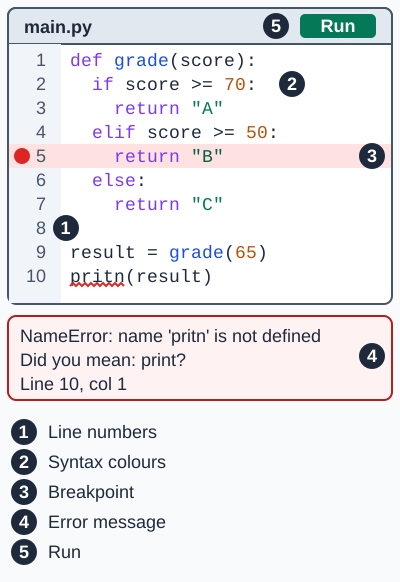
The Run button starts the program in the run-time environment. The error message is the error diagnostics. Exam board note: line numbers, syntax highlighting (syntax colours) and breakpoints are named by Edexcel. Error diagnostics and the run-time environment are named by OCR.
Key IDE Features
| Feature | Description | Benefit |
|---|---|---|
| Code Editor | Area to write and edit code | Central workspace |
| Line Numbers | Numbers every line of code | Find the line an error message points to |
| Syntax Highlighting | Colours keywords, strings, comments | Easier to read, spot errors |
| Auto-complete | Suggests code as you type | Faster coding, fewer typos |
| Error Detection (Error Diagnostics) | Highlights errors before running | Catch mistakes early |
| Debugger | Step through code, inspect variables | Find and fix bugs |
| Run-time Environment | Execute code within IDE | Test without leaving IDE |
Deep Dive: Debugging Features
| Feature | Description |
|---|---|
| Breakpoints | Pause execution at specific lines to inspect state |
| Step Through | Execute code one line at a time |
| Watch Variables | Monitor variable values as code runs |
| Error Messages | Detailed information about what went wrong |
Deep Dive: Popular IDEs
| IDE | Languages |
|---|---|
| Visual Studio Code | Python, JavaScript, many more |
| PyCharm | Python |
| IDLE | Python (comes with Python) |
| Eclipse | Java |
| Thonny | Python (beginner-friendly) |
Memory Trick
SCARED - IDE features:
Syntax highlighting
Code editor
Auto-complete
Run-time environment
Error detection
Debugger
Exam Tips
- Debugger ≠ bug fixing: It helps FIND bugs, doesn't fix them automatically
- Name features correctly: "Syntax highlighting" not "colour coding"
- Link to purpose: Always explain WHY each feature helps programmers
Make this stick
Signing in gives access to all PrepWise features.