Test yourself on IDE Features with exam style questions, marked instantly.
Flashcards that come back just before you would forget them.
A revision plan that remembers what you know and shows what to do next.
See which topics you have nailed and which need another look.
Quiz yourself on IDE FeaturesGet your flashcardsBuild my revision planTrack my progressThe Programmer's Workshop
An IDE (Integrated Development Environment) is like a workshop with all your tools in one place. Instead of opening separate programs to write code, compile it, run it, and fix bugs, an IDE combines everything: a text editor with smart features, a compiler/interpreter, a debugger, and more. It's like having a car mechanic's garage with all the diagnostic tools, lifts, and parts right there - everything you need in one place.
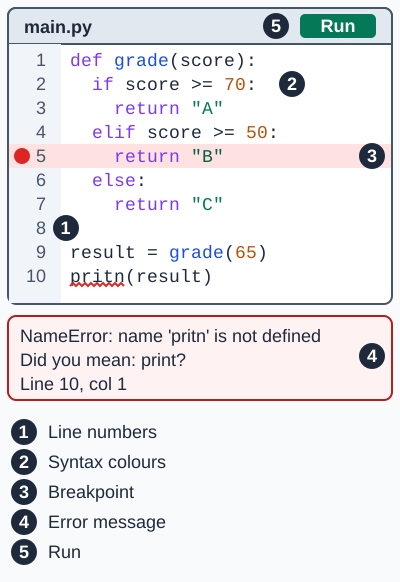
The Run button starts the program in the run-time environment. The error message is the error diagnostics. Exam board note: line numbers, syntax highlighting (syntax colours) and breakpoints are named by Edexcel. Error diagnostics and the run-time environment are named by OCR.
Make this stick
Signing in gives access to all PrepWise features.