Test yourself on CPU Performance with exam style questions, marked instantly.
Flashcards that come back just before you would forget them.
A revision plan that remembers what you know and shows what to do next.
See which topics you have nailed and which need another look.
Quiz yourself on CPU PerformanceGet your flashcardsBuild my revision planTrack my progressThe Restaurant Kitchen Revisited
Deep Dive: Why We Need All Three Factors
Why can't we just increase clock speed forever? In the early 2000s, CPUs hit a wall. Increasing clock speed beyond about 4-5 GHz generates so much heat that the CPU would melt! This is why modern CPUs focus on multiple cores and larger cache instead of just raw speed.
The Power Wall: Doubling clock speed roughly quadruples power consumption and heat generation. At very high speeds, the CPU uses more power for cooling than for actual computing!
Modern approach: Instead of a single 10 GHz core (impossible to cool), we have 8 cores at 3 GHz each. This gives better overall performance while staying cool and efficient. Plus large cache (up to 64MB!) reduces memory wait times.
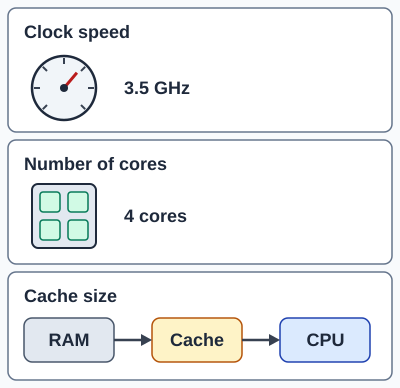
Factor 1: Clock Speed (Measured in GHz)
What It Is:
The CPU operates on a "clock" that ticks at a regular rate. Clock speed measures how many times per second the clock ticks. Each tick is called a cycle.
Measured In:
- Hertz (Hz): 1 cycle per second
- Megahertz (MHz): 1 million cycles per second (1,000,000 Hz)
- Gigahertz (GHz): 1 billion cycles per second (1,000,000,000 Hz)
- Example: A 3.2 GHz CPU ticks 3.2 billion times every second!
How It Affects Performance:
- Higher clock speed = more instructions per second
- The CPU can complete more FDE cycles in the same time
- Example: 4 GHz CPU is roughly twice as fast as 2 GHz CPU (same architecture)
- BUT: Higher speed = more heat and power consumption
Important Limitation:
Not all instructions take the same number of cycles! A simple ADD might take 1 cycle, but a MULTIPLY might take 3-4 cycles. A DIVIDE could take 10+ cycles. So doubling clock speed doesn't always double real-world performance.
Factor 2: Number of Cores
What It Is:
Modern CPUs have multiple processing units (cores) on a single chip. Each core can execute its own set of instructions independently.
Common Configurations:
- Dual-core: 2 cores (can run 2 tasks simultaneously)
- Quad-core: 4 cores (can run 4 tasks simultaneously)
- Hexa-core: 6 cores
- Octa-core: 8 cores
- High-end: 16, 32, or even 64 cores for servers!
How It Affects Performance:
- Parallel processing: Multiple tasks can run at the exact same time
- Better multitasking: Browse web, listen to music, run antivirus simultaneously without slowdown
- Each core has its own: ALU, registers, L1 cache (but shares L3 cache)
- Example: 4-core CPU can run 4 programs at once, or split 1 program across 4 cores
Important Limitation:
Not all programs can use multiple cores! A program must be specifically written to split work across cores (called "multi-threading"). A single-threaded program on a 4-core CPU will only use 1 core, wasting the others. This is why some old programs run slowly on modern CPUs.
Factor 3: Cache Memory (L1, L2, L3)
What It Is:
Cache is a small amount of very fast memory built directly into the CPU chip. It stores frequently-used data and instructions so the CPU doesn't have to wait for slower RAM.
Cache Levels:
- L1 Cache: Smallest (32-128 KB per core), fastest, located closest to CPU cores. Separate for instructions and data.
- L2 Cache: Medium (256 KB - 1 MB per core), slightly slower than L1, still very fast.
- L3 Cache: Largest (4-64 MB shared across all cores), slowest cache level but still much faster than RAM.
How It Works:
- When CPU needs data, it checks L1 first (fastest)
- If not in L1, checks L2
- If not in L2, checks L3
- If not in any cache, fetches from RAM (slowest) - called a "cache miss"
- Cache hit rate: % of time data is found in cache (higher is better)
How It Affects Performance:
- More cache = fewer RAM accesses = faster performance
- Cache is 50-100x faster than RAM!
- Example: L1 cache access = ~4 clock cycles, RAM access = ~200 clock cycles
- Larger cache means more data can be kept close to CPU
Performance Factor Comparison
| Factor | How It Helps | Limitation | Measured In |
|---|---|---|---|
| Clock Speed | More FDE cycles per second | Heat/power limit (~5 GHz max) | GHz (billions/second) |
| Cores | Multiple tasks simultaneously | Programs must support multi-threading | Number (2, 4, 8, etc.) |
| Cache | Reduces wait time for data | Very expensive, limited space on chip | MB (megabytes) |
Exam Tips - CPU Performance
Don't just name the factors - explain HOW they improve performance:
- Clock Speed: "Higher GHz means more FDE cycles per second, so more instructions executed"
- Cores: "Multiple cores allow parallel processing, so multiple tasks run simultaneously"
- Cache: "More cache stores frequently-used data closer to CPU, reducing wait time for slower RAM"
Common exam questions:
- "Name three factors affecting CPU performance" → Clock speed, cores, cache (with explanations!)
- "Why doesn't doubling cores double performance?" → Programs must be written for multi-threading
- "What is cache?" → Fast memory built into CPU that stores frequently-used data
Common mistakes:
- Saying "more RAM" improves CPU performance - RAM is NOT a CPU performance factor!
- Forgetting to explain HOW each factor helps
- Mixing up cache levels (L1 is fastest/smallest, L3 is slowest/largest)
Make this stick
Signing in gives access to all PrepWise features.