Test yourself on Utility Software with exam style questions, marked instantly.
Flashcards that come back just before you would forget them.
A revision plan that remembers what you know and shows what to do next.
See which topics you have nailed and which need another look.
Quiz yourself on Utility SoftwareGet your flashcardsBuild my revision planTrack my progressThe Computer Toolkit
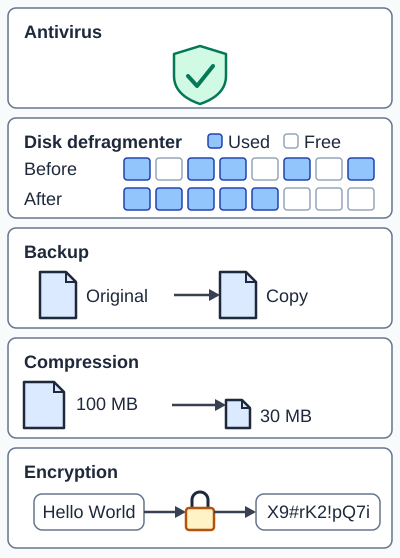
Exam board note: OCR names encryption, defragmentation and data compression. Backup and antivirus (also called anti-malware) are named by Edexcel, which also names data compression and disk defragmentation.
Types of Utility Software
| Utility | Purpose | How it Helps |
|---|---|---|
| Defragmentation | Reorganises fragmented files on HDD | Faster file access (NOT needed for SSDs) |
| Disk Cleanup | Removes temporary/unnecessary files | Frees up storage space |
| Anti-malware (antivirus) | Detects and removes malicious software | Protects system security |
| Backup | Creates copies of files/system | Recovery after data loss |
| Compression | Reduces file sizes | Saves space, faster transfers |
| Encryption | Scrambles data to make it unreadable | Protects sensitive information |
Deep Dive: Defragmentation
Why files become fragmented:
- Files saved in first available space on disk
- When files grow, extra data stored elsewhere
- Deleting files leaves gaps
- Over time, single files split across many locations
What defragmentation does:
- Rearranges file fragments to be contiguous
- Read/write head doesn't need to jump around
- Result: Faster file access on HDDs
Important: SSDs don't need defragmentation - they have no moving parts and equal access time for all locations. Defragging SSDs can actually reduce their lifespan!
Deep Dive: Backup Types
Full Backup: Copies everything. Takes longest but simplest to restore.
Incremental Backup: Only copies files changed since last backup. Fast but needs all incremental backups to restore.
Differential Backup: Copies files changed since last full backup. Balance of speed and restore simplicity.
3-2-1 Rule: 3 copies, 2 different media types, 1 offsite (cloud)
Memory Trick
Defragmentation
Anti-malware
Backup
Compression
Encryption
Exam Tips - Utility Software
- SSD vs HDD: Always mention defrag is for HDDs only - SSDs don't benefit
- Purpose questions: State what the utility does AND the benefit to the user
- Common mistake: Confusing compression (reducing size) with encryption (making unreadable)
Make this stick
Signing in gives access to all PrepWise features.