Test yourself on Images & Sound with exam style questions, marked instantly.
Flashcards that come back just before you would forget them.
A revision plan that remembers what you know and shows what to do next.
See which topics you have nailed and which need another look.
Quiz yourself on Images & SoundGet your flashcardsBuild my revision planTrack my progressThe Digital Camera Trick
Image and Sound Data Representation
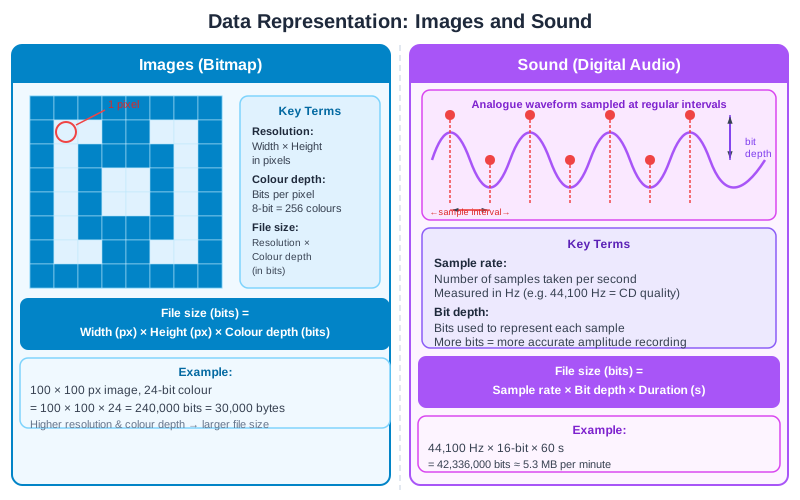
Image: the grid is the resolution (width × height) and each pixel stores its colour in a number of bits, called the colour depth. This grid has two colours, so each pixel needs 1 bit. Image file size (bits) = width × height × colour depth. Sound: the time between samples is set by the sample rate, the number of samples taken each second (Hz); Edexcel calls the gap the sample interval. Bit depth is the number of bits used for each sample (AQA calls it sample resolution). Sound file size (bits) = sample rate × bit depth × duration. For stereo sound, an extra step is to multiply by 2 channels.
Deep Dive: Digitizing the Analog World
The real world is analog - continuous, infinite detail. Light bounces everywhere, sound waves are smooth curves. But computers can only store digital data - discrete numbers.
The conversion process:
- Images: Grid of pixels, each with RGB values (sampling in 2D space)
- Sound: Thousands of measurements per second (sampling in time)
- Trade-off: More samples = better quality but larger file
- Loss: We can never capture EVERY detail, only approximations
Image Representation - Bitmap Graphics
How Bitmap Images Work:
- Pixel: Smallest unit of an image (picture element)
- Grid: Image is a 2D grid of pixels (e.g., 1920×1080 = 2,073,600 pixels)
- Color: Each pixel stores RGB values (Red, Green, Blue)
- Storage: Store every pixel's color = large files!
Key Image Properties:
1. Resolution (Width × Height):
- 1920×1080: Full HD (2.1 megapixels)
- 3840×2160: 4K UHD (8.3 megapixels)
- 4000×3000: 12 megapixels (typical phone camera)
- Higher resolution: More detail but larger file
2. Color Depth (Bits per Pixel):
- 1-bit: Black or white (2 colors)
- 8-bit: 256 colors or grayscale
- 16-bit: 65,536 colors (old games)
- 24-bit (True Color): 16.7 million colors (8 bits each for red, green and blue)
RGB Color Mixing (24-bit):
  Each pixel: Red (8 bits) + Green (8 bits) + Blue (8 bits) = 24 bits total

  Red (255, 0, 0) = pure red
  Green (0, 255, 0) = pure green
  Blue (0, 0, 255) = pure blue
  Yellow (255, 255, 0) = red + green
  White (255, 255, 255) = all colors max
  Black (0, 0, 0) = no color

  Total possible colors: 256 × 256 × 256 = 16,777,216 colors
Image File Size Calculation
Formula:
  File Size (bits) = Width × Height × Color Depth
  File Size (bytes) = (Width × Height × Color Depth) ÷ 8
Example 1: Simple Calculation
  Image: 800 × 600 pixels, 24-bit color depth

  Step 1: Calculate total pixels
  800 × 600 = 480,000 pixels

  Step 2: Calculate bits
  480,000 pixels × 24 bits = 11,520,000 bits

  Step 3: Convert to bytes
  11,520,000 bits ÷ 8 = 1,440,000 bytes

  Step 4: Convert to MB (optional)
  1,440,000 bytes ÷ 1,000,000 = 1.44 MB
Example 2: HD Photo
  Image: 1920 × 1080 pixels, 24-bit color depth

  1920 × 1080 = 2,073,600 pixels
  2,073,600 × 24 = 49,766,400 bits
  49,766,400 ÷ 8 = 6,220,800 bytes ≈ 6.2 MB
Example 3: Different Color Depths
  Same image (640 × 480 pixels) at different color depths:

  1-bit (B&W): 640 × 480 × 1 ÷ 8 = 38,400 bytes (38.4 KB)
  8-bit (256 colors): 640 × 480 × 8 ÷ 8 = 307,200 bytes (307.2 KB)
  24-bit (True Color): 640 × 480 × 24 ÷ 8 = 921,600 bytes (921.6 KB)

  24-bit is 24× larger than 1-bit!
How a Bitmap Image Is Stored
| Aspect | Bitmap image |
|---|---|
| Storage | A grid of pixels, each with a colour value |
| Enlarging | Looks pixelated when enlarged, because each pixel gets bigger |
| File size | Larger with more pixels (resolution) or more bits per pixel (colour depth) |
| Best for | Photos and realistic images |
Sound Representation - Digital Audio
How Digital Sound Works:
- Analog sound: Continuous wave (air pressure changes)
- Sampling: Measure amplitude (loudness) at regular intervals
- Digital sound: Series of numbers representing amplitude snapshots
- Playback: Convert numbers back to sound waves through speakers
Key Sound Properties:
1. Sample Rate (Samples per Second / Hz):
- 8,000 Hz: Telephone quality (low)
- 22,050 Hz: AM radio quality
- 44,100 Hz (44.1 kHz): CD quality (standard)
- 48,000 Hz: DVD/video standard
- 96,000 Hz or 192,000 Hz: Studio/hi-res audio
- Higher sample rate: Captures more detail, better quality
2. Bit Depth (Bits per Sample):
- 8-bit: 256 loudness levels (low quality, hissy)
- 16-bit: 65,536 levels (CD quality)
- 24-bit: 16.7 million levels (studio quality)
- Higher bit depth: More quality levels per sample, so the recorded sound is closer to the original
3. Channels (Mono vs Stereo):
- Mono: 1 channel (single audio stream)
- Stereo: 2 channels (left and right)
- Extra for every board: no specification names channels. Stereo sound has twice as many samples as mono, so its file is twice as big
4. Duration (Length in Seconds):
- Longer duration = more samples = larger file
Sound File Size Calculation
Formula:
  File Size (bits) = Sample Rate × Bit Depth × Duration
  File Size (bytes) = (Sample Rate × Bit Depth × Duration) ÷ 8

  Extra for stereo: multiply by 2 (two channels)
Example 1: CD Quality, 1 Second
  Sample Rate: 44,100 Hz
  Bit Depth: 16 bits
  Duration: 1 second
  Channels: 2 (stereo)

  File Size = 44,100 × 16 × 1 × 2
            = 1,411,200 bits
            = 1,411,200 ÷ 8
            = 176,400 bytes
            ≈ 176 KB per second

  For 3-minute song: 176,400 bytes × 180 seconds = 31,752,000 bytes ≈ 31.8 MB
Example 2: Telephone Quality, 10 Seconds
  Sample Rate: 8,000 Hz
  Bit Depth: 8 bits
  Duration: 10 seconds
  Channels: 1 (mono)

  File Size = 8,000 × 8 × 10 × 1
            = 640,000 bits
            = 640,000 ÷ 8
            = 80,000 bytes
            = 80 KB
Example 3: Comparing Quality Levels
  Same 1-second recording at different qualities:

  Telephone (8kHz, 8-bit, mono):
  8,000 × 8 × 1 ÷ 8 = 8,000 bytes = 8 KB/sec

  CD Quality (44.1kHz, 16-bit, stereo):
  44,100 × 16 × 1 × 2 ÷ 8 = 176,400 bytes = about 176 KB/sec

  CD is about 22 times larger than telephone! (176,400 ÷ 8,000 = 22.05)
Real-World Example: Why Music Files Are Big
Scenario: You want to store a 3-minute song in uncompressed CD quality.
- Settings: 44,100 Hz, 16-bit, stereo
- Duration: 3 minutes = 180 seconds
- Calculation: 44,100 × 16 × 180 × 2 ÷ 8 = 31,752,000 bytes ≈ 31.8 MB
- For full album (60 min): 31.8 × 20 = 636 MB!
This is why compression is essential! MP3 compression reduces this to ~3 MB per song (90% smaller) with minimal quality loss.
Exam Tips - Images & Sound
Most common exam questions:
- "Calculate image file size" → Width × Height × Color Depth ÷ 8
- "Calculate sound file size" → Sample Rate × Bit Depth × Duration ÷ 8
- "What is a pixel?" → Smallest unit of a digital image (picture element)
- "What is sample rate?" → Number of samples per second (Hz)
- "Higher sample rate = ?" → Better quality but larger file
Image calculation tips:
- Always multiply: Width × Height × Color Depth
- Don't forget to divide by 8 to convert bits → bytes
- Watch out for units: KB, MB, or bytes?
- 24-bit color = True Color (most common)
Sound calculation tips:
- Three factors: Sample Rate × Bit Depth × Duration
- Extra: if the question says stereo, multiply by 2 channels
- Duration must be in seconds
- Divide by 8 for bytes
- CD quality = 44,100 Hz, 16-bit, stereo
Common mistakes to avoid:
- Forgetting to divide by 8 (bits → bytes)
- Forgetting to multiply by 2 when a question says stereo
- Confusing width/height order
- Not converting duration to seconds
- Mixing up sample rate (Hz) with bit depth (bits)
Quick Reference - Images & Sound
Image Formula:
File Size (bytes) = Width × Height × Color Depth ÷ 8
Sound Formula:
  File Size (bytes) = Sample Rate × Bit Depth × Duration ÷ 8
  (Extra: × 2 for stereo)
Common Values to Know:
- Image: 24-bit color depth = True Color (16.7M colors)
- Sound: CD quality = 44,100 Hz, 16-bit, stereo
- Sound (extra): Stereo = 2 channels, Mono = 1 channel
- HD resolution: 1920×1080 pixels
Quality Trade-offs:
- Higher resolution: More pixels = better detail but larger file
- Higher color depth: More colors = better quality but larger file
- Higher sample rate: More samples = better sound but larger file
- Higher bit depth: More detail = better audio but larger file
Make this stick
Signing in gives access to all PrepWise features.