Test yourself on Binary Arithmetic with exam style questions, marked instantly.
Flashcards that come back just before you would forget them.
A revision plan that remembers what you know and shows what to do next.
See which topics you have nailed and which need another look.
Quiz yourself on Binary ArithmeticGet your flashcardsBuild my revision planTrack my progressThe Lego Addition Machine
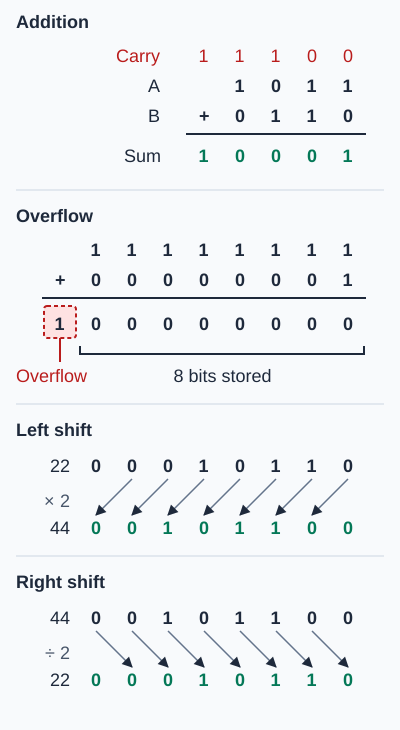
Check each answer in denary. Addition: 11 + 6 = 17, and 10001 is 16 + 1 = 17. Overflow: 255 + 1 = 256, which needs 9 bits, so the 8 bit result shows 0 (overflow is named by OCR and Edexcel). Shifts: 22 × 2 = 44 for a left shift of one place, and 44 ÷ 2 = 22 for a right shift of one place.
Deep Dive: Why Binary Arithmetic Matters
Remember the ALU (Arithmetic Logic Unit) from the CPU? Its entire job is performing binary arithmetic. Every calculation you do - adding scores in a game, rendering graphics, compressing files - ultimately breaks down into binary addition and logical operations.
Understanding binary arithmetic helps you understand:
- Why computers have integer limits (overflow errors)
- How multiplication/division can be optimized (bit shifts)
- Why negative numbers work the way they do (two's complement)
- How the CPU performs calculations at hardware level
Binary Addition - The Foundation
Binary Addition Rules (just like denary!):
  0 + 0 = 0  (no carry)
  0 + 1 = 1  (no carry)
  1 + 0 = 1  (no carry)
  1 + 1 = 10 (0 with carry 1) ← This is like 9+1=10 in denary!

  With carry from previous column:
  1 + 1 + 1 (carry) = 11 (1 with carry 1)
Example 1: Simple Addition (no carry)
    0011  (3)
  + 0101  (5)
  ------
    1000  (8)

  Check: 3 + 5 = 8 ✓
Example 2: Addition with Carry
    0110  (6)
  + 0111  (7)
  ------
   ¹¹¹   ← carry bits
    1101  (13)

  Step-by-step:
  Column 1 (rightmost): 0+1 = 1
  Column 2: 1+1 = 0, carry 1
  Column 3: 1+1+carry(1) = 1, carry 1
  Column 4: 0+0+carry(1) = 1

  Result: 1101 = 13 ✓
Example 3: Multiple Carries
    10111  (23)
  + 01110  (14)
  -------
   ¹¹ ¹   ← carry bits
   100101  (37)

  Check: 23 + 14 = 37 ✓
Overflow Errors - When Numbers Get Too Big
What is Overflow?
When the result of a calculation is too large to fit in the available number of bits, an overflow error occurs. The extra bits are lost!
Example: 8-bit Overflow
  8-bit can store: 0 to 255 (00000000 to 11111111)

  What happens if we add 200 + 100?

    11001000  (200)
  + 01100100  (100)
  ----------
   ¹¹¹¹¹¹¹   ← carries
  1 00101100  (This would be 300, but...)
  ↑
  This 9th bit doesn't fit in 8 bits!

  Computer sees: 00101100 = 44 (WRONG!)

  Overflow error! The carry out of the MSB is lost.
Detecting Overflow:
- Unsigned binary: Overflow if carry out of the MSB
- Real-world: Games showing "99999" max score, counters wrapping around
- Example: Pac-Man kill screen at level 256 (8-bit overflow: 255+1 = 0)
Binary Shifts - Fast Multiplication and Division
Left Shift: Multiply by 2
Shifting all bits one position to the left multiplies the number by 2. Fill the rightmost bit with 0.
  Original:      00000101 (5)
  Left shift 1:  00001010 (10) ← Multiplied by 2
  Left shift 2:  00010100 (20) ← Multiplied by 4
  Left shift 3:  00101000 (40) ← Multiplied by 8

  Why? Each position is worth 2× the previous position!
Right Shift: Divide by 2
Shifting all bits one position to the right divides the number by 2 (integer division - drops remainder). Fill the leftmost bit with 0.
  Original:       00101000 (40)
  Right shift 1:  00010100 (20) ← Divided by 2
  Right shift 2:  00001010 (10) ← Divided by 4
  Right shift 3:  00000101 (5)  ← Divided by 8
What Happens to Odd Numbers?
  Original:       00000111 (7)
  Right shift 1:  00000011 (3) ← 7÷2 = 3.5, but we get 3 (integer division)
                          ↑
  The LSB (1) is lost - remainder is dropped!
Why Shifts are Fast:
- Shifting is a single CPU cycle (very fast)
- Multiplication/division by powers of 2 is instant
- Graphics engines use shifts extensively for scaling
- Example: To multiply by 16, shift left 4 times (2⁴ = 16)
Two's Complement - Representing Negative Numbers
The Problem with Simple Sign Bit:
You might think: "Just use the leftmost bit as a sign (0=positive, 1=negative)." This causes problems: two representations of zero (±0), addition doesn't work without special logic.
Two's Complement Solution:
A clever system where the MSB has a negative place value. For 8-bit:
  Place values: -128  64  32  16   8   4   2   1

  Example: 10000101
  = (-128) + 4 + 1 = -123

  Range for 8-bit two's complement: -128 to +127
How to Convert to Two's Complement (Make Negative):
Method: Flip all bits, then add 1
Example: Convert +5 to -5
  Step 1: Start with +5:     00000101
  Step 2: Flip all bits:     11111010
  Step 3: Add 1:             11111011 = -5

  Check: -128 + 64 + 32 + 16 + 8 + 2 + 1 = -5 ✓
Why Two's Complement is Brilliant:
- Addition works the same for positive and negative numbers!
- Only one representation of zero (00000000)
- Easy to detect sign: if MSB = 1, it's negative
- Subtraction = add the negative (3 - 5 = 3 + (-5))
Example: Add -5 + 3 (Should = -2)
    11111011  (-5)
  + 00000011  (+3)
  ----------
   ¹¹¹¹¹¹¹¹ ← carries (overflow bit discarded)
  1 11111110  (-2)
  ↑
  Overflow bit is ignored in two's complement addition

  Check: 11111110 = -128 + 64 + 32 + 16 + 8 + 4 + 2 = -2 ✓
Binary Number Representations Comparison
| Representation | 8-bit Range | MSB Meaning | Use Case |
|---|---|---|---|
| Unsigned | 0 to 255 | +128 (normal place value) | Ages, counts, memory addresses |
| Sign & Magnitude | -127 to +127 | Sign bit (0=+, 1=-) | Rarely used (two zeros problem) |
| Two's Complement | -128 to +127 | -128 (negative place value) | Standard for signed integers |
Real-World Example: Game Score System
Scenario: Old arcade game uses 8-bit unsigned counter for score.
- Maximum score: 11111111 = 255
- Player reaches 255 and scores 1 more point...
- Addition: 11111111 + 00000001 = 100000000 (9 bits!)
- Overflow! 9th bit is lost, counter shows 00000000 (score wraps to 0)
- Famous bug: Pac-Man Level 256 - game tries to draw 256 fruit but overflows, crashes screen
Modern fix: Use 16-bit (0-65,535) or 32-bit (0-4,294,967,295) counters
Exam Tips - Binary Arithmetic
Most common exam questions:
- "Add these binary numbers" → Show carries, check your answer by converting to denary
- "What is overflow?" → Result too large for available bits, extra bits lost
- "Shift left by 2" → Multiplies by 4 (2²), add two 0s on right
- "Shift right by 1" → Divides by 2, add 0 on left, rightmost bit lost
- "Convert to two's complement" → Flip all bits, add 1
Binary addition tips:
- Work from RIGHT to LEFT (just like denary addition)
- Write carry bits above the calculation (small numbers)
- Remember: 1 + 1 = 0 with carry 1
- Always check your answer by converting to denary!
Shift operation tips:
- Left shift n places = multiply by 2ⁿ
- Right shift n places = divide by 2ⁿ
- Always fill with 0s (for unsigned numbers)
- Show the original and result clearly
Common mistakes to avoid:
- Forgetting to carry in binary addition
- Losing track of which direction to shift
- Saying "shift left divides" - NO! Left = multiply, right = divide
- Forgetting to add 1 after flipping bits in two's complement
- Not recognizing overflow when carry out of MSB
Quick Reference - Binary Arithmetic
Addition Rules:
  0 + 0 = 0
  0 + 1 = 1
  1 + 0 = 1
  1 + 1 = 10 (0, carry 1)
  1 + 1 + 1 = 11 (1, carry 1)
Shift Operations:
- Left shift 1: × 2
- Left shift 2: × 4
- Left shift 3: × 8
- Right shift 1: ÷ 2
- Right shift 2: ÷ 4
- Right shift 3: ÷ 8
Two's Complement Conversion:
- Flip all bits (0→1, 1→0)
- Add 1
- Done!
Number Ranges (8-bit):
- Unsigned: 0 to 255
- Two's complement: -128 to +127
Make this stick
Signing in gives access to all PrepWise features.