Test yourself on Technical Attacks with exam style questions, marked instantly.
Flashcards that come back just before you would forget them.
A revision plan that remembers what you know and shows what to do next.
See which topics you have nailed and which need another look.
Quiz yourself on Technical AttacksGet your flashcardsBuild my revision planTrack my progressThe Network Battlefield
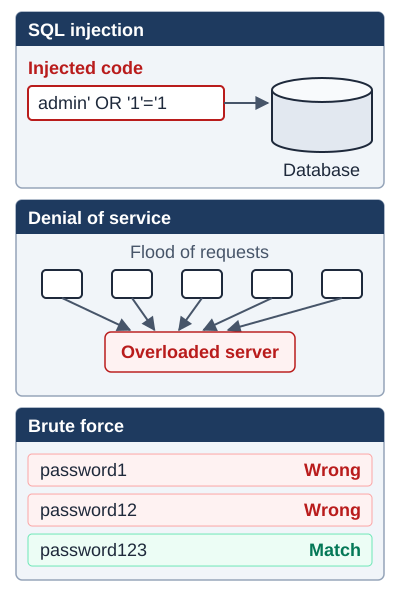
Exam boards: SQL injection, denial of service and brute force are named by OCR.
What are Technical Attacks?
Technical attacks (also called network threats or cyber attacks) exploit vulnerabilities in computer systems, networks, or software. Unlike social engineering which targets humans, these attacks target technical weaknesses in systems.
Common Network Threats
| Threat | Description | Impact |
|---|---|---|
| Brute Force | Trying every possible password combination systematically | Account access, data theft |
| Denial of Service (DoS and DDoS) | Flooding server with traffic from multiple sources | Service unavailable, business disruption |
| SQL Injection | Inserting malicious code into database queries | Data theft, database corruption, authentication bypass |
| Man-in-the-Middle | Intercepting communication between two parties | Data theft, altered communications, eavesdropping |
| Data Interception | Capturing data as it travels across network | Privacy breach, credential theft |
| Insider Threats | Malicious actions by authorised users | Data theft, sabotage, privilege abuse |
Deep Dive: SQL Injection Explained
SQL injection exploits poorly coded websites that don't validate user input. Here's a step-by-step example:
Normal login process:
- User enters username:
alice - Website creates SQL query:
SELECT * FROM users WHERE username='alice' - Database checks if 'alice' exists and returns the user record
SQL injection attack:
- Attacker enters username:
' OR '1'='1 - Website creates SQL query:
SELECT * FROM users WHERE username='' OR '1'='1' - Since
'1'='1'is ALWAYS true, this returns ALL users - bypassing authentication! - Attacker gains unauthorized access without knowing any passwords
Prevention methods:
- Input validation: Check that inputs match expected format (e.g., usernames contain only letters/numbers)
- Input sanitization: Remove or escape special characters like quotes
- Parameterised queries: Separate SQL code from user data so injected code isn't executed
- Prepared statements: Pre-compile SQL queries so user input can't alter query structure
Deep Dive: DDoS (Distributed Denial of Service)
How it works:
- Attacker compromises thousands of computers (creating a "botnet")
- All compromised computers simultaneously send requests to target server
- Server is overwhelmed by massive traffic volume
- Legitimate users can't access the service (denial of service)
DoS vs DDoS:
- DoS (Denial of Service): Attack from ONE source - easier to block
- DDoS (Distributed DoS): Attack from MULTIPLE sources - much harder to defend against
Business impact:
- Website/service becomes completely unavailable
- Lost revenue from inability to process transactions
- Reputation damage and loss of customer trust
- Cost of mitigation services and recovery
Deep Dive: Brute Force Attacks
- Method: Systematically trying every possible password combination until finding the correct one
- Dictionary attack variant: Tries common passwords first (password123, qwerty, etc.) - faster than pure brute force
- Time factor: Short simple passwords can be cracked in minutes; long complex passwords take years
- Prevention methods:
- Account lockout: Lock account after X failed attempts (e.g., 3-5 tries)
- Strong passwords: Minimum 12+ characters with mixed case, numbers, symbols
- CAPTCHA: Proves user is human, not automated script
- Rate limiting: Slow down login attempts (delays between tries)
- Multi-factor authentication: Requires second factor even if password is correct
Exam Tips
- DDoS vs DoS: DDoS uses MULTIPLE attacking computers (distributed), DoS uses ONE - emphasize the "distributed" aspect!
- SQL Injection: Always mention it targets DATABASES through USER INPUT fields (forms, search boxes)
- Common mistake: Don't confuse brute force (trying ALL passwords) with dictionary attack (trying COMMON passwords)
- Prevention answers: Give SPECIFIC technical methods, not vague answers like "be careful"
- Impact questions: Consider business impact (revenue loss, reputation) not just technical impact
Memory Tricks
- Brute Force = Brute strength approach - trying everything through sheer force
- DDoS = Distributed (many sources) Denial (blocking) of Service
- SQL Injection = Injecting SQL code into inputs
- MITM = Man In The Middle - sitting between two parties
Make this stick
Signing in gives access to all PrepWise features.