Test yourself on Prevention Methods with exam style questions, marked instantly.
Flashcards that come back just before you would forget them.
A revision plan that remembers what you know and shows what to do next.
See which topics you have nailed and which need another look.
Quiz yourself on Prevention MethodsGet your flashcardsBuild my revision planTrack my progressThe Security Castle
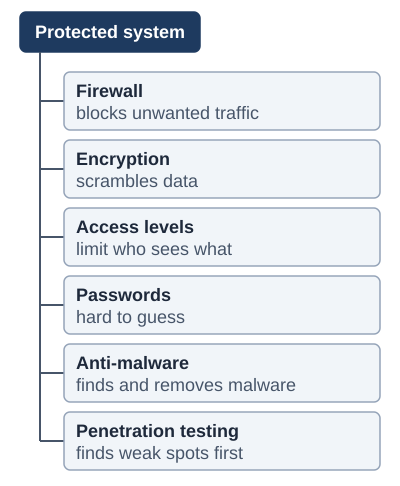
Exam boards: OCR names all six methods. AQA and Edexcel name most of them, including firewalls, encryption and penetration testing.
Network Security Overview
Network security involves multiple layers of defence (defence in depth) to protect systems, networks, and data from attacks. No single security measure is perfect, so organisations use multiple complementary methods.
Security Methods
| Method | Description | Protects Against |
|---|---|---|
| Firewall | Monitors and filters network traffic based on rules | Unauthorised access, malware, network attacks |
| Encryption | Converts data into unreadable code; needs key to decrypt | Data interception, theft, eavesdropping |
| Authentication | Verifying identity (passwords, biometrics, 2FA) | Unauthorised access, identity theft |
| Access Control (access levels) | Limiting what users can access based on role | Data breaches, insider threats, privilege abuse |
| Anti-malware | Scans for malware, then finds and removes it | Viruses, worms, Trojans, spyware |
| Penetration Testing | Authorised testing to find vulnerabilities | Unknown weaknesses, security gaps |
| Backups | Regular copies of data stored separately | Data loss, ransomware, system failure |
Deep Dive: Firewalls
A firewall sits between your internal network and the external Internet, acting as a security checkpoint.
How it works:
- Monitors traffic: Inspects all incoming and outgoing network packets
- Applies rules: Uses predefined rules to decide whether to allow or block traffic
- Filtering criteria:
- Source IP address: Where is traffic coming from?
- Destination IP address: Where is it going?
- Protocol: What type of traffic is it? (e.g., HTTP, HTTPS, FTP)
- Action: Allow (permit traffic) or Deny (block traffic)
Example firewall rules:
- Allow: HTTP traffic from any source to web server
- Allow: HTTPS traffic from any source to web server
- Deny: All FTP traffic from external sources
- Deny: All other traffic by default
Deep Dive: Encryption
How encryption works: Data is scrambled into an unreadable form using a key. Only someone with the right key can turn it back into readable data.
Common uses of encryption:
- HTTPS: Encrypts web traffic (look for padlock in browser)
- Email encryption: Protects message contents (e.g., PGP, S/MIME)
- Full disk encryption: Protects data on stolen laptops/phones (e.g., BitLocker, FileVault)
- VPN: Creates encrypted tunnel for all network traffic
- Messaging apps: End-to-end encryption (e.g., WhatsApp, Signal)
Deep Dive: Multi-Factor Authentication (MFA)
MFA requires multiple forms of verification from different categories:
- Something you KNOW:
- Password or PIN
- Security questions
- Pattern/gesture
- Something you HAVE:
- Phone (SMS code or authenticator app)
- Security key/token (e.g., YubiKey)
- Smart card or badge
- Something you ARE:
- Fingerprint
- Face recognition
- Iris or retina scan
- Voice recognition
Why MFA is effective: Even if an attacker steals your password (something you know), they still need your phone (something you have) or fingerprint (something you are). This makes accounts dramatically more secure - most attacks are stopped by MFA.
Deep Dive: Access Control
- Principle of least privilege: Users only get access to resources they need for their job - nothing more
- Role-based access control (RBAC): Permissions assigned based on job role (e.g., "Manager" role has different access than "Employee" role)
- User permissions: Read, Write, Execute, Delete - can be set per file/folder/resource
- Access control lists (ACLs): Specify which users/groups can access which resources
- Benefits: Limits damage from compromised accounts, prevents insider threats, maintains data confidentiality
Deep Dive: Penetration Testing (Pen Testing)
- What it is: Authorised, simulated cyber attack to find security vulnerabilities
- Who does it: Ethical hackers or security professionals with explicit permission
- Types:
- Black box: Testers have no prior knowledge (mimics external attacker)
- White box: Testers have full knowledge of system (thorough testing)
- Grey box: Testers have partial knowledge (mimics insider threat)
- Process: Reconnaissance → Scanning → Exploitation → Reporting → Remediation
- Benefits: Find vulnerabilities before real attackers, validate security controls, meet compliance requirements
Exam Tips
- Firewall: Always mention it filters traffic based on RULES and uses criteria like source/destination address
- Encryption: Emphasize that encrypted data is USELESS without the decryption key - that's why it's effective
- Authentication vs Authorisation: Authentication = WHO you are (login); Authorisation = WHAT you can do (permissions)
- MFA factors: Remember the THREE categories - something you know/have/are (not just "two passwords"!)
- Common question: "Describe how [method] protects against [threat]" - explain the MECHANISM clearly, not just "it protects"
- Defence in depth: Multiple layers of security are better than relying on one method
Memory Tricks
- Firewall = Fire wall - barrier that stops dangerous things getting through
- Encrypt = En-crypt = Put in a crypt (hidden/secret)
- 2FA = 2 Factors for Access
- Pen Test = Penetration Testing = Testing how to penetrate security
- MFA categories = Know, Have, Are (KHA)
- HTTPS padlock = S for Secure (encrypted)
Make this stick
Signing in gives access to all PrepWise features.