Test yourself on Logic Gates with exam style questions, marked instantly.
Flashcards that come back just before you would forget them.
A revision plan that remembers what you know and shows what to do next.
See which topics you have nailed and which need another look.
Quiz yourself on Logic GatesGet your flashcardsBuild my revision planTrack my progressThe Decision Makers Inside Computers
Logic Gates Reference
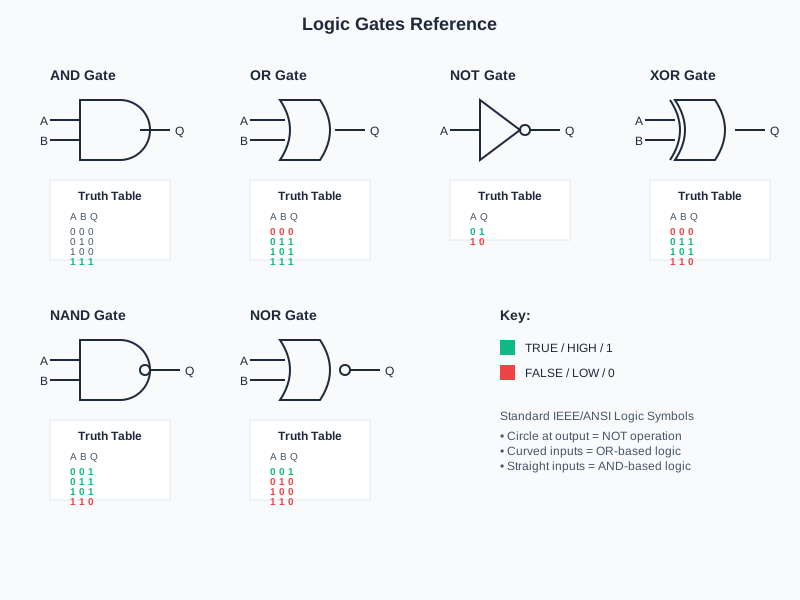
Deep Dive: The Three Basic Logic Gates
AND gates are like security doors that need BOTH a keycard AND a fingerprint. Only when ALL inputs are 1 (true) does the output become 1. It's the strictest gate - everything must be true.
OR gates are like motion sensors that trigger if EITHER the door sensor OR the window sensor detects movement. If ANY input is 1 (true), the output is 1. At least one condition must be met.
NOT gates are inverters - they flip the signal. If the input is 0, output is 1. If input is 1, output is 0. Think of it as a "do the opposite" gate.
Why this matters: Every single computation in your computer - from calculating 2+2 to rendering 3D graphics - ultimately comes down to billions of these simple gates making binary decisions at lightning speed.
The Three Basic Gates
1. AND Gate - The "Both Required" Gate
- Rule: Output is 1 ONLY if ALL inputs are 1
- Symbol: D-shape with flat back
- Expression: Q = A AND B
- Real example: Microwave runs only if door is closed AND start button is pressed
Memory trick: AND = "All Need to be true"
2. OR Gate - The "Any Will Do" Gate
- Rule: Output is 1 if ANY input is 1 (one or more)
- Symbol: Curved back, pointed front
- Expression: Q = A OR B
- Real example: Burglar alarm sounds if window sensor OR door sensor is triggered
Memory trick: OR = "One Required"
3. NOT Gate - The "Opposite" Gate
- Rule: Output is the OPPOSITE of input (0→1, 1→0)
- Symbol: Triangle with small circle (bubble) at output
- Expression: Q = NOT A
- Real example: Fridge light turns on when door is NOT closed (i.e., when open)
Memory trick: NOT = "Negates/Opposite of This"
Notation note: AQA papers may write AND as a dot, OR as a plus and NOT as a bar over the letter. OCR and Edexcel papers use the words AND, OR and NOT.
Logic Gate Symbols
Truth Tables - All Possible Combinations
A truth table shows the output for EVERY possible combination of inputs. With 2 inputs, there are 4 possible combinations (2² = 4).
| AND Gate Truth Table | OR Gate Truth Table | NOT Gate Truth Table | |||||
|---|---|---|---|---|---|---|---|
| A | B | Q (A AND B) | A | B | Q (A OR B) | A | Q (NOT A) |
| 0 | 0 | 0 | 0 | 0 | 0 | 0 | 1 |
| 0 | 1 | 0 | 0 | 1 | 1 | 1 | 0 |
| 1 | 0 | 0 | 1 | 0 | 1 | ||
| 1 | 1 | 1 | 1 | 1 | 1 | ||
AND Gate: Only ONE row outputs 1 (the last row: 1,1 → 1). All need to be true!
OR Gate: Only ONE row outputs 0 (the first row: 0,0 → 0). At least one needed!
NOT Gate: Just FLIPS the bit - 0 becomes 1, 1 becomes 0
Real-World Examples of Logic Gates
| Gate Type | Real-World Application | Logic Explanation |
|---|---|---|
| AND | Car starting system | Key inserted AND brake pressed → Engine starts (both conditions required) |
| AND | Microwave oven | Door closed AND Start pressed → Microwave runs (safety requirement) |
| OR | Home security alarm | Window broken OR Door forced → Alarm sounds (either triggers alert) |
| OR | Smart lights | Voice command OR Motion sensor → Light turns on (multiple triggers) |
| NOT | Refrigerator light | NOT(door closed) → Light on (light when door is open) |
| NOT | Automatic doors | NOT(obstruction detected) → Door closes (inverts sensor signal) |
Exam Tips - Logic Gates
Drawing gate symbols:
- AND gate: Draw a D-shape (flat back, curved front)
- OR gate: Draw a pointed shape (curved back, pointed front)
- NOT gate: Draw a triangle with a small circle (bubble) at the output
- The bubble ALWAYS means NOT (inversion)
Common exam mistakes to avoid:
- Forgetting that AND requires ALL inputs to be 1 - not just one!
- Confusing AND and OR symbols - remember AND is D-shaped, OR is pointed
- Missing the NOT bubble - it's essential for showing inversion
- Wrong truth table: AND has only ONE 1 (bottom row), OR has only ONE 0 (top row)
Quick truth table memory tricks:
- AND: Think "strict gate" - only 1,1 passes through → gives 1
- OR: Think "generous gate" - only 0,0 blocks → gives 0
- NOT: Think "flip gate" - whatever goes in, opposite comes out
Make this stick
Signing in gives access to all PrepWise features.