Test yourself on Social Engineering with exam style questions, marked instantly.
Flashcards that come back just before you would forget them.
A revision plan that remembers what you know and shows what to do next.
See which topics you have nailed and which need another look.
Quiz yourself on Social EngineeringGet your flashcardsBuild my revision planTrack my progressThe Art of Deception
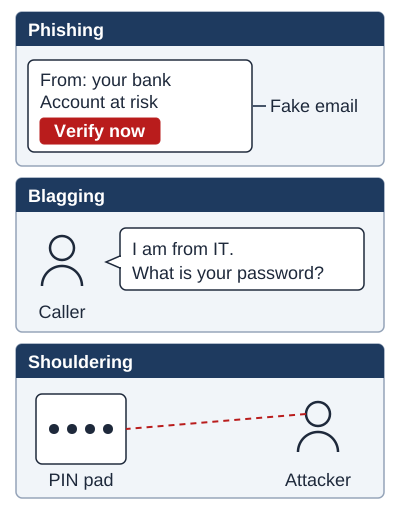
Exam boards: phishing is named by AQA and OCR. Blagging (also called pretexting) and shouldering (also called shoulder surfing) are named by AQA.
What is Social Engineering?
Social engineering is the psychological manipulation of people into performing actions or revealing confidential information. Unlike technical attacks that exploit system vulnerabilities, social engineering exploits human psychology - trust, curiosity, fear, and helpfulness.
Why it works: Humans are naturally trusting and want to be helpful. Attackers exploit these traits by appearing legitimate, creating urgency, or appealing to authority.
Types of Social Engineering Attacks
| Attack Type | Method | Example |
|---|---|---|
| Phishing | Fake emails/websites pretending to be legitimate | Email from "your bank" asking to verify details |
| Spear Phishing | Targeted phishing at specific individuals | Personalised email to company CEO |
| Blagging (pretexting) | Creating false scenario to gain trust | Caller claims to be IT support needing password |
| Baiting | Offering something enticing to lure victim | Infected USB drive left in car park |
| Tailgating | Following authorised person into secure area | Walking through door behind employee |
| Shouldering (shoulder surfing) | Watching someone enter sensitive information | Looking over shoulder as someone types PIN |
Social Engineering Attack Types - Visual Map
Key principle: Every social engineering attack exploits human psychology, not technical vulnerabilities.
Deep Dive: Recognising Phishing Emails
Phishing emails are designed to look legitimate, but there are tell-tale signs:
- Urgency and threats: "Act now or your account will be closed!" - Creates panic to bypass rational thinking
- Generic greeting: "Dear Customer" or "Dear User" instead of your actual name
- Suspicious links: Hover over links to see real URL (amaz0n.com vs amazon.com - note the zero!)
- Spelling/grammar errors: Professional companies proofread their communications
- Requests for sensitive info: Banks NEVER ask for passwords, PINs, or full card numbers via email
- Mismatched sender address: Display name says "PayPal" but email is from @paypa1-security.ru
- Unexpected attachments: Especially .exe, .zip, or macros in documents
The golden rule: If in doubt, don't click! Contact the organisation directly using official contact details (not the details in the suspicious email).
Deep Dive: How to Protect Against Social Engineering
- Staff training and awareness: Regular training on recognizing social engineering attempts
- Verification policies: Implement strict identity verification before sharing information (callback procedures)
- Email filtering: Use spam filters and email authentication (SPF, DKIM, DMARC)
- Multi-factor authentication: Even if passwords are stolen, MFA prevents unauthorized access
- Access control: Limit information access to only those who need it (principle of least privilege)
- Physical security: Badge systems, visitor logs, locked doors to prevent tailgating
- Reporting culture: Encourage staff to report suspicious activity without fear of blame
Exam Tips
- Key concept: Social engineering exploits HUMANS, not technical vulnerabilities - always emphasize this!
- Prevention: Training and awareness are the best defences (you can't "patch" humans like software)
- Common mistake: Don't confuse phishing (fake emails) with pharming (redirecting to fake websites)
- Phishing identification: Give SPECIFIC red flags (urgency, generic greeting, suspicious links, spelling errors)
- Spear vs regular phishing: Spear phishing is TARGETED at specific individuals with personalized information
Memory Tricks
- Phishing = Fishing for information with bait (fake emails)
- Spear Phishing = Targeted like throwing a spear at one specific fish
- Pretexting = Creating a pretext (fake story/scenario)
- Baiting = Using bait (tempting offers like USB drives)
- Tailgating = Following someone's tail through a door
- Shoulder Surfing = Surfing (looking) over someone's shoulder
Make this stick
Signing in gives access to all PrepWise features.