Test yourself on Storage Units with exam style questions, marked instantly.
Flashcards that come back just before you would forget them.
A revision plan that remembers what you know and shows what to do next.
See which topics you have nailed and which need another look.
Quiz yourself on Storage UnitsGet your flashcardsBuild my revision planTrack my progressThe Lego Building Blocks
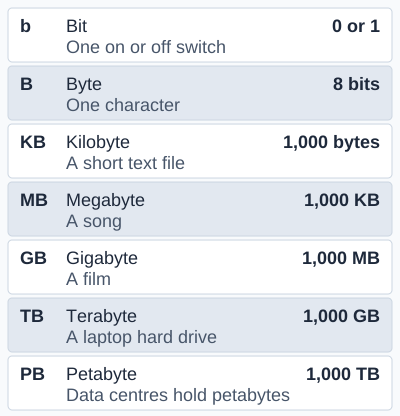
The figure counts in steps of 1,000, as AQA and OCR do. OCR also accepts 1,024 in conversions, and Edexcel names the 1,024 units kibibyte and mebibyte. The petabyte is named by OCR only. A nibble (OCR and Edexcel) is 4 bits, half a byte.
Deep Dive: 1,000 or 1,024 Bytes?
In GCSE Computer Science, calculations use 1 KB = 1,000 bytes unless the question says otherwise. Some systems count in powers of 2 instead, because computers work in binary (base 2). The closest power of 2 to 1,000 is 210 = 1,024. This creates two conventions:
- Decimal system (1,000): 1 KB = 1,000 bytes (the GCSE rule used by AQA and OCR, and by hard drive manufacturers)
- Binary system (1,024): 1 KiB = 1,024 bytes. OCR accepts 1,024 in conversions, and Edexcel names the 1,024 units kibibyte (KiB), mebibyte (MiB) and so on. Edexcel: 1 KiB = 1,024 bytes and 1 MiB = 1,024 KiB.
This is why your "1 TB" hard drive shows as only 931 GB in Windows: the manufacturer used decimal (1,000^4 bytes) but Windows uses binary (1,024^4 bytes). You didn't lose 69 GB, it's just a measurement difference. Neither value is "wrong": always check which one your question uses.
The Storage Unit Hierarchy
From Smallest to Largest:
1. Bit (b) - The Smallest Unit:
- A single binary digit: 0 or 1
- Can represent: on/off, true/false, yes/no
- Symbol: lowercase 'b' (e.g., 100 Mb/s = megabits per second)
- Used for: network speeds, download speeds
2. Nibble - 4 Bits:
- 1 nibble = 4 bits (half a byte)
- Named by OCR and Edexcel
- Example: one hexadecimal digit fits in a nibble
3. Byte (B) - 8 Bits:
- 1 byte = 8 bits
- Can represent: one character (letter, number, symbol)
- Symbol: uppercase 'B' (e.g., 100 MB/s = megabytes per second)
- Range: 0 to 255 (28 = 256 different values)
- Example: The word "Hi!" = 3 bytes (3 characters)
4. Kilobyte (KB) - 1,000 Bytes:
- 1 KB = 1,000 bytes
- Can store: a paragraph of text, a small icon
- Example: Short email (5-10 KB), small webpage (50 KB)
5. Megabyte (MB) - 1,000 KB:
- 1 MB = 1,000 KB = 1,000,000 bytes
- Can store: a photo, a minute of MP3 music, a short video
- Example: High-res photo (3-5 MB), 1 minute MP3 (1 MB)
6. Gigabyte (GB) - 1,000 MB:
- 1 GB = 1,000 MB = 1,000,000,000 bytes
- Can store: a short HD film, 300 photos, 250 songs
- Example: HD movie (4-8 GB), PC game (20-50 GB), smartphone storage (64-256 GB)
7. Terabyte (TB) - 1,000 GB:
- 1 TB = 1,000 GB = 1,000,000,000,000 bytes
- Can store: 250 HD movies, 250,000 songs, 500,000 photos
- Example: Hard drives (1-20 TB), Netflix server storage
8. Petabyte (PB) - 1,000 TB:
- 1 PB = 1,000 TB = 1,000,000 GB
- Named by OCR only
- Can store: 500 billion pages of text, 13 years of HD video
- Example: Google processes ~20 PB of data per day, Facebook stores ~300 PB of photos
9. Exabyte (EB) and Beyond:
- 1 EB = 1,000 PB - beyond GCSE: AQA stops at the terabyte and OCR at the petabyte
Quick Conversion Reference
| Unit | GCSE (1,000) | Some systems (1,024) | In Bytes |
|---|---|---|---|
| Byte (B) | 1 B | 1 B | 1 byte |
| Kilobyte (KB) | 1,000 B | 1,024 B | ~1 thousand |
| Megabyte (MB) | 1,000 KB | 1,024 KB | ~1 million |
| Gigabyte (GB) | 1,000 MB | 1,024 MB | ~1 billion |
| Terabyte (TB) | 1,000 GB | 1,024 GB | ~1 trillion |
| Petabyte (PB) | 1,000 TB | 1,024 TB | ~1 quadrillion |
Conversion Calculations - Step by Step
Method 1: Converting UP (smaller to larger units)
Divide by 1,000 for each step up
- Bytes → KB: Divide by 1,000
- KB → MB: Divide by 1,000
- MB → GB: Divide by 1,000
- GB → TB: Divide by 1,000
Example 1: Convert 5,000 KB to MB
5,000 KB ÷ 1,000 = 5 MB
Example 2: Convert 3,000 MB to GB
3,000 MB ÷ 1,000 = 3 GB
Method 2: Converting DOWN (larger to smaller units)
Multiply by 1,000 for each step down
- TB → GB: Multiply by 1,000
- GB → MB: Multiply by 1,000
- MB → KB: Multiply by 1,000
- KB → Bytes: Multiply by 1,000
Example 3: Convert 2 GB to MB
2 GB × 1,000 = 2,000 MB
Example 4: Convert 4 MB to bytes
4 MB × 1,000 = 4,000 KB
4,000 KB × 1,000 = 4,000,000 bytes
Shortcut: Jumping Multiple Levels
- MB → Bytes: Multiply by 1,000,000
- GB → Bytes: Multiply by 1,000,000,000
- Bytes → MB: Divide by 1,000,000
Example 5: Convert 500,000,000 bytes to MB
500,000,000 ÷ 1,000,000 = 500 MB
If a question tells you to use 1,024, use 1,024 for every step instead (for example, 2 GB × 1,024 = 2,048 MB).
Real-World Calculation: File Size for Storage Planning
Scenario: You have a 128 GB USB drive. How many 4K photos can you store if each photo is 8 MB?
Step 1: Convert USB drive to same unit as photo
128 GB × 1,000 = 128,000 MB
Step 2: Divide total space by photo size
128,000 MB ÷ 8 MB = 16,000 photos
Answer: You can store approximately 16,000 photos on the 128 GB USB drive.
Bits vs Bytes - The Confusion!
Why Two Different Units?
- Bits (b): Used for data TRANSMISSION (network speeds, download speeds)
- Bytes (B): Used for data STORAGE (file sizes, disk capacity)
The 8:1 Rule:
Since 1 byte = 8 bits, you divide by 8 to convert:
- 100 Mbps internet: 100 ÷ 8 = 12.5 MB/s actual download speed
- 1 Gbps fiber: 1000 ÷ 8 = 125 MB/s actual download speed
Example Calculation:
You have 50 Mbps internet. How long to download a 500 MB file?
Step 1: Convert Mbps to MB/s: 50 ÷ 8 = 6.25 MB/s
Step 2: Divide file size by speed: 500 MB ÷ 6.25 MB/s = 80 seconds
Exam Tips - Storage Units
Most common exam questions:
- "How many bytes in a kilobyte?" → 1,000 bytes (check the question: some say 1,024)
- "Convert X KB to MB" → Divide by 1,000
- "Convert X GB to MB" → Multiply by 1,000
- "How many MB in 2 GB?" → 2 × 1,000 = 2,000 MB
- File size calculations → Total size ÷ file size = number of files
Key conversion facts to memorize:
- 1 byte = 8 bits (ALWAYS 8, never changes)
- 1 nibble = 4 bits
- 1 KB = 1,000 bytes
- 1 MB = 1,000 KB
- 1 GB = 1,000 MB
- 1 TB = 1,000 GB
Common mistakes to avoid:
- Using 1,024 when the question tells you to use 1,000
- Confusing bits (b) with bytes (B) - lowercase vs uppercase matters!
- Multiplying when you should divide (or vice versa)
- Forgetting to convert to the same units before calculations
- Not showing working - always show your calculation steps!
Calculation strategy:
- Read carefully: bits or bytes? KB, MB, or GB?
- Convert to same units: Both in MB or both in GB
- Choose operation: Smaller→Larger = divide, Larger→Smaller = multiply
- Show working: Write each step clearly
- Check answer: Does it make sense? (GB should be smaller number than MB)
Quick Reference - Storage Units
The Ladder (Memorize This!):
  1 bit = 0 or 1
  1 nibble = 4 bits
  1 byte = 8 bits
  1 KB = 1,000 bytes
  1 MB = 1,000 KB
  1 GB = 1,000 MB
  1 TB = 1,000 GB
  1 PB = 1,000 TB
Real-World Sizes:
- 1 KB: Short email, small text file
- 1 MB: High-quality photo, 1 minute of music
- 1 GB: A short HD film, ~300 photos
- 1 TB: 250 movies, 250,000 songs, your entire computer backup
Common File Sizes:
- Text document: 50-500 KB
- Photo (phone): 2-5 MB
- Photo (DSLR): 5-20 MB
- Song (MP3): 3-5 MB
- HD movie: 4-8 GB
- PC game: 20-100 GB
Make this stick
Signing in gives access to all PrepWise features.