Test yourself on Compression with exam style questions, marked instantly.
Flashcards that come back just before you would forget them.
A revision plan that remembers what you know and shows what to do next.
See which topics you have nailed and which need another look.
Quiz yourself on CompressionGet your flashcardsBuild my revision planTrack my progressThe Travel Packing Problem
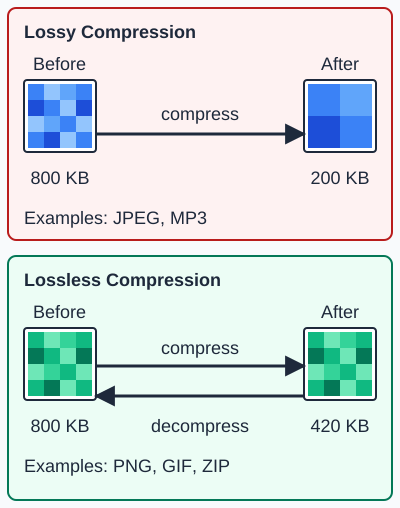
Lossy compression removes some data for good, so the file is much smaller. Lossless compression removes no data, so the original comes back exactly. The terms lossy and lossless are named by OCR and Edexcel. AQA covers two lossless methods, Huffman coding and run-length encoding.
Deep Dive: Why Compression Matters
Remember Topic 15? An uncompressed 3-minute CD-quality song = 31.8 MB. A 4K movie uncompressed = 6,000 GB (6 TB)! Without compression:
- Your 128GB phone would store ~4,000 photos instead of 40,000
- Netflix would need 100× more servers
- Downloading a movie would take days instead of minutes
- Web pages would load in minutes instead of seconds
Compression is the invisible hero that makes modern digital life possible. Every photo, song, video, and web page you interact with is compressed.
Lossless Compression - Perfect Recreation
What is Lossless Compression?
- Reduces file size WITHOUT losing any data
- Original file can be perfectly reconstructed
- Uses patterns and redundancy to make files smaller
- Typical reduction: 30-70% smaller (varies by file type)
When to Use Lossless:
- Text documents: Word files, PDFs, code - every character matters
- Programs/executables: One wrong bit = program crashes
- Medical images: X-rays, MRI scans - diagnosis requires exact detail
- Legal documents: Contracts, evidence - must be identical to original
- Scientific data: Research data, measurements - accuracy critical
Common Lossless Formats:
- ZIP, RAR, 7z: General file compression/archiving
- PNG: Lossless image format (screenshots, diagrams, graphics with text)
- FLAC: Lossless audio (music archiving, audiophiles)
- GIF: Simple animations and graphics (limited to 256 colors)
- GZIP: Web compression (HTML, CSS, JavaScript files)
Run-Length Encoding (RLE) - Simple Lossless
How RLE Works:
Replace repeated values with a count + value. Instead of "AAAAAABBCC", store "6A2B2C".
Example 1: Simple Pattern
  Original: WWWWWWBBBWWW (12 characters)
  RLE:      6W3B3W (6 characters)

  Saved: 50% compression ratio
Example 2: Binary Data
  Original: 00000000111111110000000 (23 bits)
  RLE:      8×0, 8×1, 7×0 (3 pairs)

  Stored as: 8,0,8,1,7,0
Example 3: Image Data (Scanline)
  Image row (colors): RRRRRRGGGGBBBBBB (16 pixels)
  RLE:                6R4G6B (3 pairs)

  Original: 16 pixels × 3 bytes = 48 bytes
  RLE:      3 pairs × (count + color) = 6 bytes
  Saved:    87.5%!
When RLE Works Well:
- Large blocks of same color: Simple graphics, logos, cartoons
- Black and white images: Scanned documents, faxes
- Video frames: Large unchanged areas between frames
When RLE Fails:
- No repetition: ABCDEFGH → 1A1B1C1D1E1F1G1H (BIGGER!)
- Random data: Photos, complex images - little to no repetition
- Can make file larger if there's no pattern
Dictionary-Based Compression
How Dictionary Compression Works:
Build a dictionary of common patterns/phrases. Replace patterns with short codes.
Simple Example:
  Text: "the cat sat on the mat the rat sat"

  Dictionary:
  1 = "the "
  2 = "sat "
  3 = "at "

  Compressed: "1cat 2on 1m31r32"

  Original: 33 characters
  Compressed: ~17 characters + dictionary
Real Applications:
- ZIP files: Use lossless compression to shrink files
- GIF images: Use lossless compression for images with few colors
- PDF files: Text and object compression
- Works best: Text files, code, HTML (lots of repeated words/patterns)
Lossy Compression - Good Enough Quality
What is Lossy Compression?
- Reduces file size by PERMANENTLY removing data
- Original cannot be perfectly recreated
- Removes details human senses can't detect (or barely notice)
- Typical reduction: 80-95% smaller (massive savings!)
When to Use Lossy:
- Photos: Vacation pics, social media - slight quality loss unnoticeable
- Music: Streaming, portable devices - most people can't tell difference
- Video: YouTube, Netflix - optimized for human perception
- General rule: Media for human consumption where exact precision isn't critical
Common Lossy Formats:
- JPEG (.jpg): Photos - 90-95% compression, widely supported
- MP3: Music - 90% smaller than WAV, near-CD quality
- MP4, H.264, H.265: Video - streaming, YouTube, Netflix
- AAC: Music - Apple's audio format (iTunes, iPhone)
- WebP: Web images - Google's format (better than JPEG)
How Lossy Compression Works
Key Principle: Remove What Humans Can't Perceive
For Images (JPEG):
- Human eye limitations: More sensitive to brightness than color
- Strategy: Keep brightness detail, reduce color detail
- Averaging: Group nearby similar pixels, store average
- Discard high frequencies: Remove fine texture details
- Result: 10× smaller file, looks nearly identical to most viewers
For Audio (MP3):
- Human hearing limitations: Can't hear very high/low frequencies
- Psychoacoustic masking: Loud sounds mask quiet nearby sounds
- Strategy: Remove frequencies humans can't hear
- Remove masked sounds: Quiet sounds near loud ones = discarded
- Result: 10× smaller, sounds nearly identical to CD
Quality Levels (User Control):
- Low quality: 90% compressed - visible/audible artifacts
- Medium quality: 85% compressed - good balance (default)
- High quality: 70% compressed - minimal loss, larger file
- Trade-off: More compression = smaller file but worse quality
Lossless vs Lossy Compression
| Aspect | Lossless | Lossy |
|---|---|---|
| Data Loss | None - perfect reconstruction | Permanent - some data removed |
| Compression Ratio | 30-70% smaller (moderate) | 80-95% smaller (extreme) |
| Reversible | Yes - decompress to exact original | No - cannot recover lost data |
| Best For | Text, programs, medical images, legal docs | Photos, music, video, web images |
| Examples | PNG, ZIP, FLAC, GIF | JPEG, MP3, MP4, AAC |
| When to Use | When every bit matters / exact copy needed | When human perception is primary concern |
Real-World Example: Photo Sharing
Scenario: You take a 12MP photo with your phone camera.
- Uncompressed RAW: 36 MB (12 million pixels × 3 bytes)
- PNG (lossless): ~18 MB (50% compression - some redundancy removed)
- JPEG high quality: ~3 MB (92% compression - barely noticeable loss)
- JPEG medium quality: ~800 KB (98% compression - slight artifacts)
- JPEG low quality: ~200 KB (99.4% compression - visible blocks)
For Instagram/Facebook: JPEG medium (800 KB) is perfect - 45× smaller, looks great on phones!
For photo printing: JPEG high (3 MB) or PNG (18 MB) - need quality for large prints
Exam Tips - Compression
Most common exam questions:
- "Difference between lossy and lossless?" → Lossless = perfect reconstruction; Lossy = permanent data loss
- "When to use lossy?" → Photos, music, video - for human viewing/listening
- "When to use lossless?" → Text, programs, medical images - need exact copy
- "Examples of lossy?" → JPEG, MP3, MP4
- "Examples of lossless?" → PNG, ZIP, FLAC
- "How does RLE work?" → Replace repeated values with count + value
Key comparison facts:
- Lossless: 30-70% compression, reversible, exact original
- Lossy: 80-95% compression, irreversible, "good enough" quality
- Trade-off: Quality vs file size - can't have both!
RLE exam questions:
- Always show the pattern: AAAAAABBB → 6A3B
- Count + Value format
- Works best when there are LONG runs of repeated data
- Can make files LARGER if no repetition
Common mistakes to avoid:
- Saying "lossy is always better" - NO! Depends on use case
- Confusing lossless with lossy file formats (JPEG is lossy, PNG is lossless)
- Forgetting that lossy is PERMANENT - you can't "uncompress" to perfect quality
- Not explaining WHY you'd use one over the other
Quick Reference - Compression
Lossless Compression:
- Characteristic: Perfect reconstruction, no data loss
- Compression: 30-70% reduction
- Reversible: Yes
- Use for: Text, programs, medical images, archives
- Formats: PNG, ZIP, FLAC, GIF, RAR, 7z
- Algorithms: Run length encoding and Huffman coding (both AQA only)
Lossy Compression:
- Characteristic: Data permanently removed
- Compression: 80-95% reduction
- Reversible: No
- Use for: Photos, music, video, web images
- Formats: JPEG, MP3, MP4, AAC, WebP, H.264
- Strategy: Remove what humans can't perceive
RLE Quick Guide:
- Pattern: WWWWWBBB → 5W3B
- Format: Count + Value
- Best for: Long runs of repeated data
- Worst for: Random data (can make file larger!)
The Golden Rule:
If you need the EXACT original back: use lossless. If "good enough" is fine and you need small files: use lossy.
Make this stick
Signing in gives access to all PrepWise features.